How to Use OctoBrowser With Thordata

In an era dominated by data security and digital sovereignty, anti-detection browsers have become indispensable for professionals in all walks of life. From digital marketers and affiliate managers to e-commerce entrepreneurs and cybersecurity experts, the demand for tools that can easily manage multiple accounts and protect online anonymity continues to soar.
In this guide, we will cover OctoBrowser’s main features and explain how to integrate it with Thordata Proxy for secure and seamless operation.
What is OctoBrowser?
OctoBrowser is a powerful anti-detection browser designed for multi-account management and online privacy. It enables users to create and manage multiple browser profiles with unique fingerprints, making it ideal for anyone working in automation. With built-in proxy support, team collaboration features, and powerful anti-fingerprinting technology, OctoBrowser ensures safe, efficient, and anonymous browsing on a variety of platforms.
Understanding OctoBrowser’s Capabilities
Advanced Fingerprint Management
Octo Browser offers granular control over browser fingerprints, allowing users to customize parameters such as operating system, screen resolution, timezone, fonts, geolocation, and language settings. This level of customization ensures each browser profile mimics a unique real-world device, enhancing anonymity.
Robust Proxy Integration
The browser supports various proxy protocols, including HTTP and SSH. Users can effortlessly add single or bulk proxies, facilitating efficient management of multiple accounts. Integration with IPRoyal proxies further enhances this capability, providing a vast pool of residential IPs for secure browsing.
Automation and Team Collaboration
Octo Browser’s API allows for automation of routine tasks, such as account creation and data scraping, using frameworks like Selenium, Puppeteer, and Playwright. Additionally, its team features enable collaborative work environments, with options to share profiles, assign roles, and track activity history.
How to integrate Thordata with Octobrowser
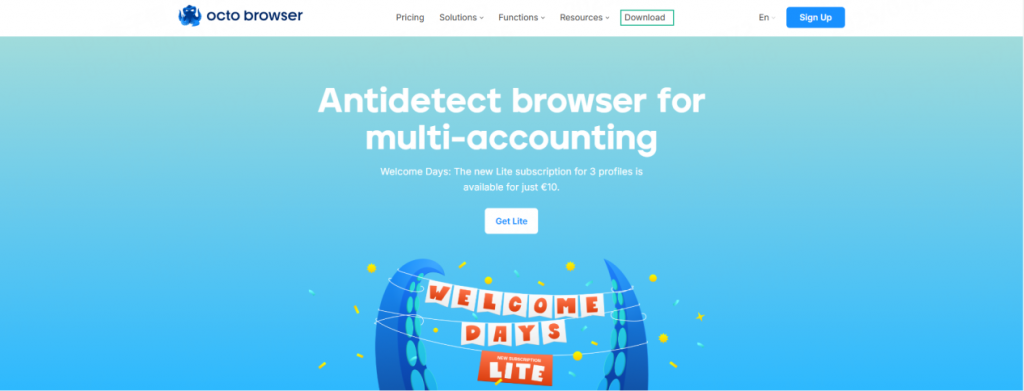
1. Log in to the official website of OctoBrowser, click Download to download and install
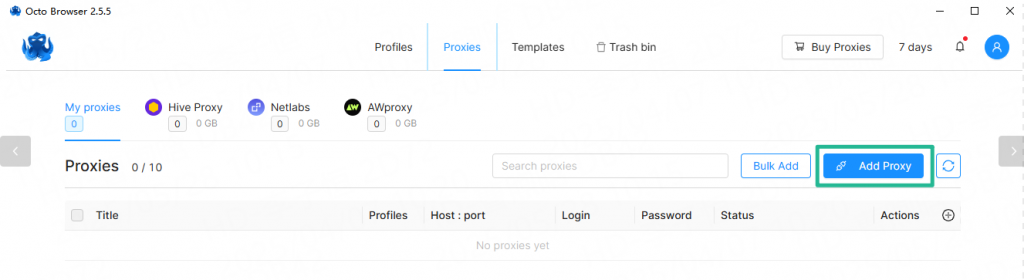
2. Enter the main interface and click [Add Proxy]
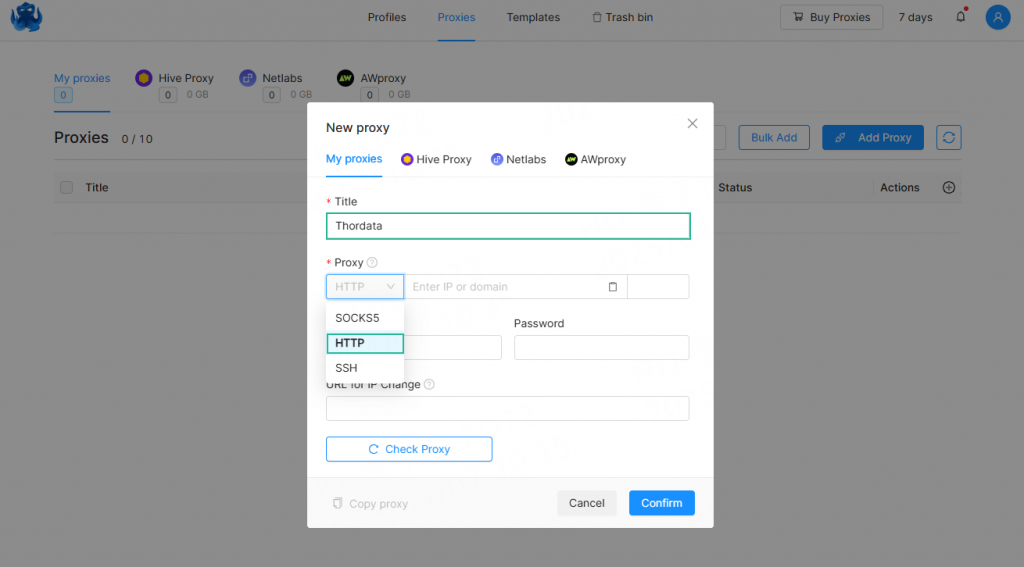
3. After selecting Add, select [HTTP] in Proxy Type
4. Enter the IP and host information. The following is an example.
IP information: t.pr.thordata.net:9999
Login: customer-username
Password: customer-password
After the proxy information is configured, click [Check Proxy] to test. After confirming that the test is successful, click [Confirm] to create it.
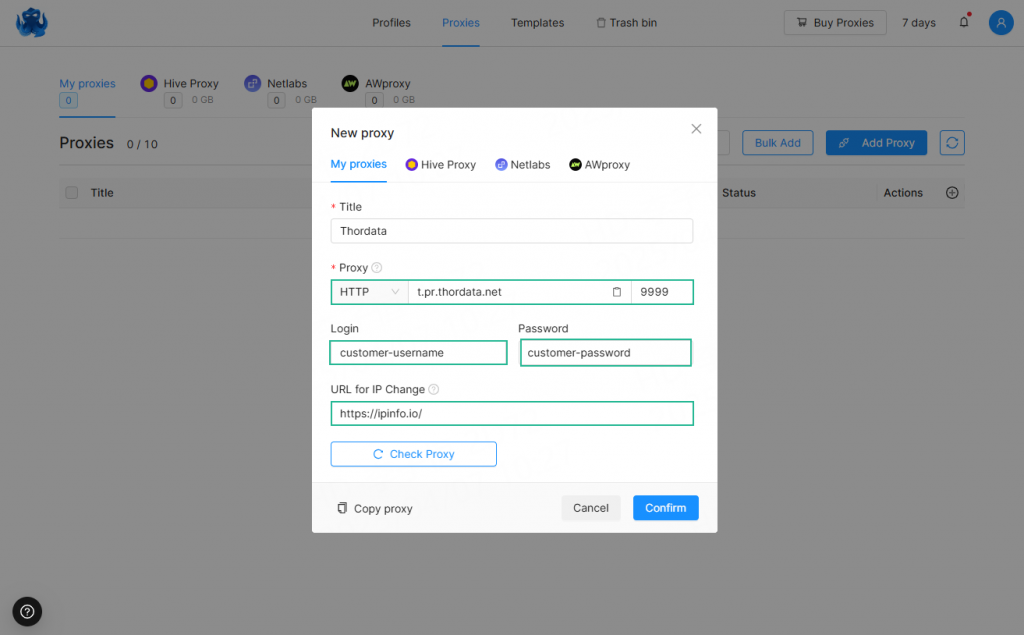
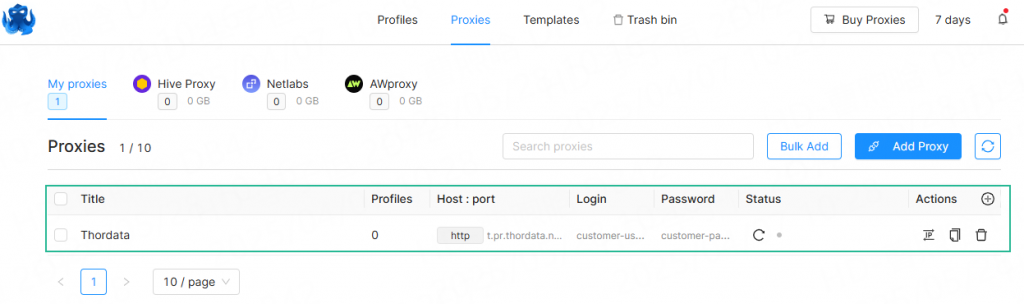
5. After successful creation, you can see the IP information on the main interface
Why Thordata Proxies Are Ideal for Octo Browser
|
Feature |
Benefit |
|
Ensures authenticity and untraceable traffic |
|
|
Global Coverage |
Country, region, and city-level targeting |
|
Fast Proxy Rotation |
Ideal for high-frequency multi-account operations |
|
Protocol Support |
Full compatibility with HTTP/HTTPS |
|
Secure Authentication |
IP Whitelisting and credential-based access |
Conclusion
Octo Browser, when paired with high-quality proxies like those from Thordata, becomes an unstoppable tool for identity management, automation, and global-scale operations. Its depth of customization, advanced fingerprinting, and enterprise collaboration features make it the preferred choice for professionals who demand both power and precision.
To maximize your Octo Browser experience, always use high-trust proxies, maintain operational discipline, and leverage Octo’s automation to reduce human error. The future of anti-detect browsing lies in such integrated, high-performance ecosystems.
Frequently asked questions
How do I use Thordata with Octo Browser?
Add Thordata’s IP and port in Octo Browser’s proxy settings. Each profile gets a unique IP and hidden device info.
Why pair Thordata with Octo Browser?
Stops platforms from banning your accounts. Thordata hides your IP; Octo Browser hides your device’s identity. Simple protection.
Can this help with multiple Amazon/Facebook accounts?
Yes! Each account gets a fake “device” and real-looking IP. Platforms think they’re all separate users. No bans.
About the author
Jenny is a Content Specialist with a deep passion for digital technology and its impact on business growth. She has an eye for detail and a knack for creatively crafting insightful, results-focused content that educates and inspires. Her expertise lies in helping businesses and individuals navigate the ever-changing digital landscape.
The thordata Blog offers all its content in its original form and solely for informational intent. We do not offer any guarantees regarding the information found on the thordata Blog or any external sites that it may direct you to. It is essential that you seek legal counsel and thoroughly examine the specific terms of service of any website before engaging in any scraping endeavors, or obtain a scraping permit if required.

 Looking for
Top-Tier Residential Proxies?