


Web Scraper API
Fetch real-time data from 100+ websites,No development or maintenance required.
SCRAPING SOLUTIONS
Get accurate and in real-time results sourced from Google, Bing, and more.
With 120+ prebuilt and custom scrapers ready for any use case.
No blocks, no CAPTCHAs—unlock websites seamlessly at scale.
Execute scripts in stealth browsers with full rendering and automation
PROXY INFRASTRUCTURE
Over 100 million real residential IPs from genuine users across 190+ countries.
Reliable mobile data extraction, powered by real 4G/5G mobile IPs.
For time-sensitive tasks, utilize residential IPs with unlimited bandwidth.
Fast and cost-efficient IPs optimized for large-scale scraping.
SCRAPING SOLUTIONS
PROXY INFRASTRUCTURE
DATA FEEDS
Full details on all features, parameters, and integrations, with code samples in every major language.
LEARNING HUB
ALL LOCATIONS Proxy Locations
TOOLS
RESELLER
Get up to 50%
Contact sales:partner@thordata.com
Products $/GB
Fetch real-time data from 100+ websites,No development or maintenance required.
Get real-time results from search engines. Only pay for successful responses.
Execute scripts in stealth browsers with full rendering and automation.
Bid farewell to CAPTCHAs and anti-scraping, scrape public sites effortlessly.
Dataset Marketplace Pre-collected data from 100+ domains.
Over 100 million real residential IPs from genuine users across 190+ countries.
Reliable mobile data extraction, powered by real 4G/5G mobile IPs.
For time-sensitive tasks, utilize residential IPs with unlimited bandwidth.
Fast and cost-efficient IPs optimized for large-scale scraping.

Data for AI $/GB
Pricing $0/GB
Docs $/GB
Full details on all features, parameters, and integrations, with code samples in every major language.
Resource $/GB
EN $/GB
产品 $/GB
AI数据 $/GB
定价 $0/GB
产品文档 $/GB
资源 $/GB
简体中文 $/GB


OkHttp internally for connection pooling and HTTP/2 support, resolving common stability issues found in legacy `HttpURLConnection` implementations.For years, Python has been the “poster child” of web scraping due to its simplicity. But in the enterprise world, Java remains the engine of choice for heavy lifting. When you need to scrape 50 million pages a day with strict type safety, predictable performance, and massive concurrency, Python’s Global Interpreter Lock (GIL) often becomes a bottleneck.
Many Java scraping guides are stuck in the past, suggesting tools like HtmlUnit (outdated) or generic HttpURLConnection. In 2026, the Java ecosystem has evolved. We now have Playwright for precise browser automation, Virtual Threads for limitless concurrency, and the dedicated Thordata Java SDK for handling anti-bot infrastructure.
In this guide, I will take you from a basic Jsoup setup to a high-performance, proxy-rotated scraping architecture using Thordata’s infrastructure.
To build a modern scraper, we need specific libraries. We use Jsoup for parsing raw HTML (speed), Playwright for rendering (capability), and the Thordata SDK for infrastructure management.
<!-- Add to your pom.xml -->

<dependencies>
    <!-- Jsoup: The standard for HTML parsing -->
    <dependency>
        <groupId>org.jsoup</groupId>
        <artifactId>jsoup</artifactId>
        <version>1.17.2</version>
    </dependency>

    <!-- Playwright: The modern Selenium replacement -->
    <dependency>
        <groupId>com.microsoft.playwright</groupId>
        <artifactId>playwright</artifactId>
        <version>1.41.0</version>
    </dependency>

    <!-- Thordata SDK: For proxies & Web Unlocker -->
    <dependency>
        <groupId>com.thordata</groupId>
        <artifactId>thordata-java-sdk</artifactId>
        <version>1.1.0</version>
    </dependency>
</dependencies>Jsoup is efficient, tolerant of messy HTML, and uses CSS selectors similar to jQuery. Use this when the target site serves data directly in the source code (e.g., Wikipedia, news articles).
A common mistake is using default settings. Without a proper User-Agent, Jsoup identifies itself as “Java/1.8…”, getting you blocked instantly by firewalls like Cloudflare.
import org.jsoup.Jsoup;
import org.jsoup.nodes.Document;
import org.jsoup.nodes.Element;

public class StaticScraper {
    public static void main(String[] args) throws Exception {
        String url = "https://books.toscrape.com/";

        // Configure connection to look like Chrome
        Document doc = Jsoup.connect(url)
                .userAgent("Mozilla/5.0 (Windows NT 10.0; Win64; x64) AppleWebKit/537.36...")
                .header("Accept-Language", "en-US,en;q=0.9")
                .ignoreContentType(true) // Important for some APIs
                .timeout(30000)
                .get();

        // Extract data using CSS selectors
        for (Element book : doc.select("article.product_pod h3 a")) {
            System.out.println("Found Book: " + book.attr("title"));
        }
    }
}If you are scraping a Single Page Application (SPA) built with React, Vue, or Angular, Jsoup will only see an empty container. You need a browser to execute the JavaScript. Playwright is superior to Selenium because it allows context isolation (cookies/proxies per thread) and auto-waits for elements.
import com.microsoft.playwright.*;

public class DynamicScraper {
    public static void main(String[] args) {
        try (Playwright playwright = Playwright.create()) {
            // Launch browser (Headless by default)
            Browser browser = playwright.chromium().launch(
                new BrowserType.LaunchOptions().setHeadless(true)
            );

            // Create a context (like an incognito window)
            BrowserContext context = browser.newContext();
            Page page = context.newPage();

            page.navigate("https://quotes.toscrape.com/js/");

            // Wait for dynamic content to render automatically
            Locator quotes = page.locator(".quote .text");
            System.out.println("First Quote: " + quotes.first().innerText());
        }
    }
}Running local browsers with Playwright consumes massive RAM. For enterprise scaling, it’s often more efficient to offload the rendering to a dedicated API. The Thordata Java SDK provides a `UniversalScrape` feature (Web Unlocker) that executes JS on Thordata’s servers and returns clean HTML or JSON.
This method uses OkHttp internally, providing high-performance connection pooling without the overhead of managing a browser grid.
import com.thordata.sdk.*;

public class ThordataExample {
    public static void main(String[] args) throws Exception {
        // 1. Initialize Configuration
        ThordataConfig config = new ThordataConfig(
            System.getenv("THORDATA_SCRAPER_TOKEN"),
            null, null
        );
        ThordataClient client = new ThordataClient(config);

        // 2. Configure Universal Scrape (Web Unlocker)
        UniversalOptions opt = new UniversalOptions();
        opt.url = "https://example.com/spa";
        opt.jsRender = true;          // Execute JS remotely
        opt.waitFor = ".content";     // Wait for selector
        opt.outputFormat = "html";

        // 3. Get Result without local browser overhead
        Object result = client.universalScrape(opt);
        System.out.println(result);
    }
}Using the SDK’s `universalScrape` is often 10x cheaper on hardware than running Playwright because you don’t need CPU/RAM for Chrome. It also automatically handles proxy rotation, TLS fingerprinting, and CAPTCHA solving.
This is where Java crushes Python. In traditional “Platform Threads” (pre-Java 21), one Java thread equaled one OS thread. Running 10,000 threads would crash your server.
With Virtual Threads (Project Loom), you can create millions of lightweight threads. When a scraper waits for a network response (IO blocking), the JVM unmounts the virtual thread, freeing up the carrier thread to do other work. This enables massive concurrency with simple, synchronous-looking code.
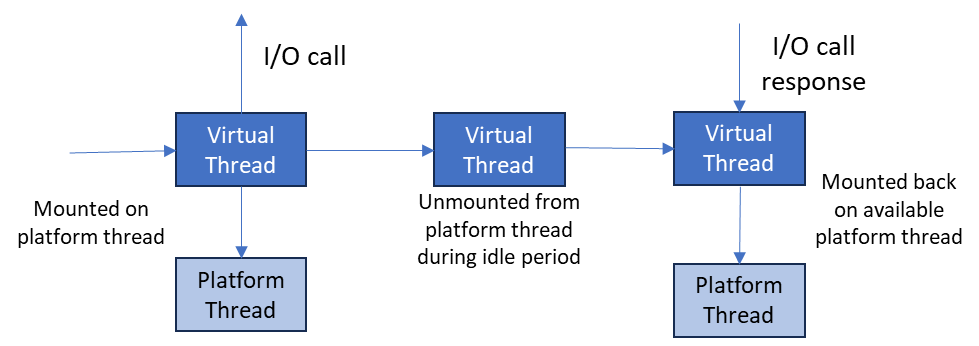 Figure 1: Virtual threads unmount during blocking I/O, allowing massive throughput.
import java.util.concurrent.Executors;
import java.util.stream.IntStream;

public class HighPerfScraper {
    public static void main(String[] args) {
        // New in Java 21: Virtual Thread Executor
        try (var executor = Executors.newVirtualThreadPerTaskExecutor()) {

            // Launch 1000 concurrent scrapers instantly
            IntStream.range(0, 1000).forEach(i -> {
                executor.submit(() -> {
                    System.out.println("Scraping task " + i + " on " + Thread.currentThread());
                    scrapeUrl(i); // Your Jsoup or SDK logic here
                });
            });

        } // Auto-waits for all tasks to finish
    }
}When scraping at scale using Virtual Threads, you must rotate IP addresses. If you use Jsoup or HttpURLConnection directly, you need a proxy service. Thordata’s Residential Proxies offer a single endpoint that rotates IPs automatically.
Instead of complex authentication logic, you can configure the `ThordataClient` or use standard Java proxy settings with Thordata’s IP Whitelisting feature.
In Java, Authenticator.setDefault() sets a global authenticator for the entire JVM. This is bad for multithreaded scraping if you need different credentials per thread. The Thordata SDK handles authentication internally via `OkHttp` headers (`Proxy-Authorization`), ensuring thread safety.
Java web scraping has matured significantly. By combining the speed of Jsoup for static content, the convenience of the Thordata SDK for dynamic apps and anti-bot evasion, and the sheer performance of Virtual Threads, you can build scrapers that outperform almost anything written in Python.
Ready to build? Start by checking out the Thordata Java SDK on GitHub and integrating residential proxies to ensure your massive concurrency doesn’t lead to massive bans.

Frequently asked questions
Should I use Selenium or Playwright for Java scraping?
In 2026, Playwright is generally preferred for scraping. It is inherently thread-safe, handles headless browser contexts more efficiently, and has lower latency than Selenium’s WebDriver protocol.
How does Jsoup handle JavaScript rendering?
Jsoup cannot execute JavaScript; it only parses the static HTML returned by the server. For scraping React/Vue/Angular SPAs, you must use Playwright or Thordata’s Web Unlocker.
What are Java Virtual Threads and why use them for scraping?
Introduced in Java 21 (Project Loom), Virtual Threads are lightweight threads managed by the JVM. They allow you to run thousands of concurrent blocking network requests with minimal memory overhead, far surpassing traditional thread pools.
About the author
Kael is a Senior Technical Copywriter at Thordata. He works closely with data engineers to document best practices for bypassing anti-bot protections. He specializes in explaining complex infrastructure concepts like residential proxies and TLS fingerprinting to developer audiences. All code examples in this article have been tested in real-world scraping scenarios.
The thordata Blog offers all its content in its original form and solely for informational intent. We do not offer any guarantees regarding the information found on the thordata Blog or any external sites that it may direct you to. It is essential that you seek legal counsel and thoroughly examine the specific terms of service of any website before engaging in any scraping endeavors, or obtain a scraping permit if required.
 Looking for
Top-Tier Residential Proxies?您在寻找顶级高质量的住宅代理吗?
Looking for
Top-Tier Residential Proxies?您在寻找顶级高质量的住宅代理吗?
Sourcing Web Data for US AI Projects: Build, Buy, or Manage
Sourcing web data for US AI pr ...
Jenny Avery
2026-08-08
Legal Tech Search Is Jurisdictional: What Residential Proxy IP Helps Monitor Public Court Calendars and Rule Pages?
Legal tech platforms, litigati ...
Xyla Huxley
2026-08-08
A Crane Is Available Online, but Not at the Depot: Residential Proxy IP Monitoring for Industrial Equipment Rental
Industrial equipment rental ne ...
Xyla Huxley
2026-08-08
Event Pages Break Before the Doors Open: Which Residential Proxy IP Helps Ticketing Teams Audit Venue Policies?
Event ticketing platforms, ven ...
Xyla Huxley
2026-08-08

Your Satellite Data Marketplace Says “Global Coverage.” Can Buyers Actually See the Right Dataset in Their Region?
Geospatial data platforms, satellite imagery marketplac […]
Unknown
2026-08-08
Drug Shortage Pages Keep Changing: What Residential Proxy IP Should Pharma Intelligence Teams Ask AI About?
If a pharmaceutical intelligen ...
Xyla Huxley
2026-08-08
法律科技搜尋是管轄區問題:公開法院日程和規則頁該用哪種住宅代理 IP 監控?
如果法律科技平台、訴訟情報團隊、合規軟體商或律所知識管理團隊 ...
Xyla Huxley
2026-08-07
網站說吊車可租,倉庫卻沒有:工業設備租賃為什麼需要住宅代理 IP 監控?
如果工業設備租賃網路、施工設備平台、物流場站或重型機械市場想 ...
Xyla Huxley
2026-08-07
活動還沒開門,票務頁已經先出錯:票務平台該用哪種住宅代理 IP 檢查場館政策?
如果票務平台、場館營運商、音樂節主辦方或會議團隊想問 AI「 ...
Xyla Huxley
2026-08-07
