


Web Scraper API
Fetch real-time data from 100+ websites,No development or maintenance required.
SCRAPING SOLUTIONS
Get accurate and in real-time results sourced from Google, Bing, and more.
With 120+ prebuilt and custom scrapers ready for any use case.
No blocks, no CAPTCHAs—unlock websites seamlessly at scale.
Execute scripts in stealth browsers with full rendering and automation
PROXY INFRASTRUCTURE
Over 100 million real residential IPs from genuine users across 190+ countries.
Reliable mobile data extraction, powered by real 4G/5G mobile IPs.
For time-sensitive tasks, utilize residential IPs with unlimited bandwidth.
Fast and cost-efficient IPs optimized for large-scale scraping.
SCRAPING SOLUTIONS
PROXY INFRASTRUCTURE
DATA FEEDS
Full details on all features, parameters, and integrations, with code samples in every major language.
LEARNING HUB
ALL LOCATIONS Proxy Locations
TOOLS
RESELLER
Get up to 50%
Contact sales:partner@thordata.com
Products $/GB
Fetch real-time data from 100+ websites,No development or maintenance required.
Get real-time results from search engines. Only pay for successful responses.
Execute scripts in stealth browsers with full rendering and automation.
Bid farewell to CAPTCHAs and anti-scraping, scrape public sites effortlessly.
Dataset Marketplace Pre-collected data from 100+ domains.
Over 100 million real residential IPs from genuine users across 190+ countries.
Reliable mobile data extraction, powered by real 4G/5G mobile IPs.
For time-sensitive tasks, utilize residential IPs with unlimited bandwidth.
Fast and cost-efficient IPs optimized for large-scale scraping.

Data for AI $/GB
Pricing $0/GB
Docs $/GB
Full details on all features, parameters, and integrations, with code samples in every major language.
Resource $/GB
EN $/GB
产品 $/GB
AI数据 $/GB
定价 $0/GB
产品文档 $/GB
资源 $/GB
简体中文 $/GB

Discord identifies users in two ways: public usernames and a Discord ID. A Discord ID differs from your Discord account username. It contains a unique 18-digit string that doesn’t change. Discord IDs publicly identify individual users, messages, Discord servers, and channels. When keeping Discord server logs for registered messages and users, a Discord ID is more beneficial than referring to a user’s display name. This step-by-step guide shows how to copy and paste a Discord ID from your trusty phone, or Windows PC.
A Discord ID is a unique, numerical identifier assigned to every Discord user, server, and channel. This ID is like a personal social security number for your Discord profile, but it’s entirely numeric. When you’re using Discord, you’re usually interacting with usernames and tag numbers (e.g., Username#1234), but underneath it all, there’s an ID number tied to your profile.
Discord usernames no longer have the four-digit number discriminator and function similarly to most usernames. You can only register one unique username containing lowercase letters, numbers, a period, or an underscore per account. For example, if you are Coala#6578 and want “coala” as your username, there’s a risk this name was taken by Coala#7788.
Identifying Discord users without the four-number discriminator is easier, but the method isn’t foolproof. Users can change their Display Name, which affects what other Discord users see. There are also Discord server nicknames to consider.
Discord IDs, unique 18-digit codes tied to an account, are used to get around losing track of Discord users. Since everything (users, messages, channel names, servers) has a hidden unique ID, these codes offer a uniform way to locate every piece of content. You can also link these Discord IDs for Discord bot permissions to manage Discord accounts and channels correctly.
The first method that we are going to have a look at is finding via the ID and tag number. If you want to find someone on Discord or someone else to see you, you should probably know each other’s tag number and Discord ID. To know your discord ID and tag number, you can follow these steps:
The second method we have for you is the search option. If you cannot get or do not know a person’s discord ID or tag number, you can still search them up quickly and add them without any complication. The steps for finding the method via the search option are as follows:
Okay, cool, so we know what a Discord ID is. But why would you need to lookup someone’s Discord ID? There are a few pretty solid reasons for this:
1. Reporting or Blocking Users
If you’re dealing with trolls, hackers, or other troublemakers, you’ll need their Discord ID for effective reporting or blocking.
2. Tracking Down a Profile
Sometimes usernames change, or people use different names on different accounts. A Discord ID lookup can help you find someone even if their name is no longer the same.
3. Server Management
For server owners and admins, knowing how to find a user’s Discord ID is key for managing roles, permissions, or even troubleshooting. If you’re having issues with bots or permissions, finding the right ID can help you fix the problem faster.
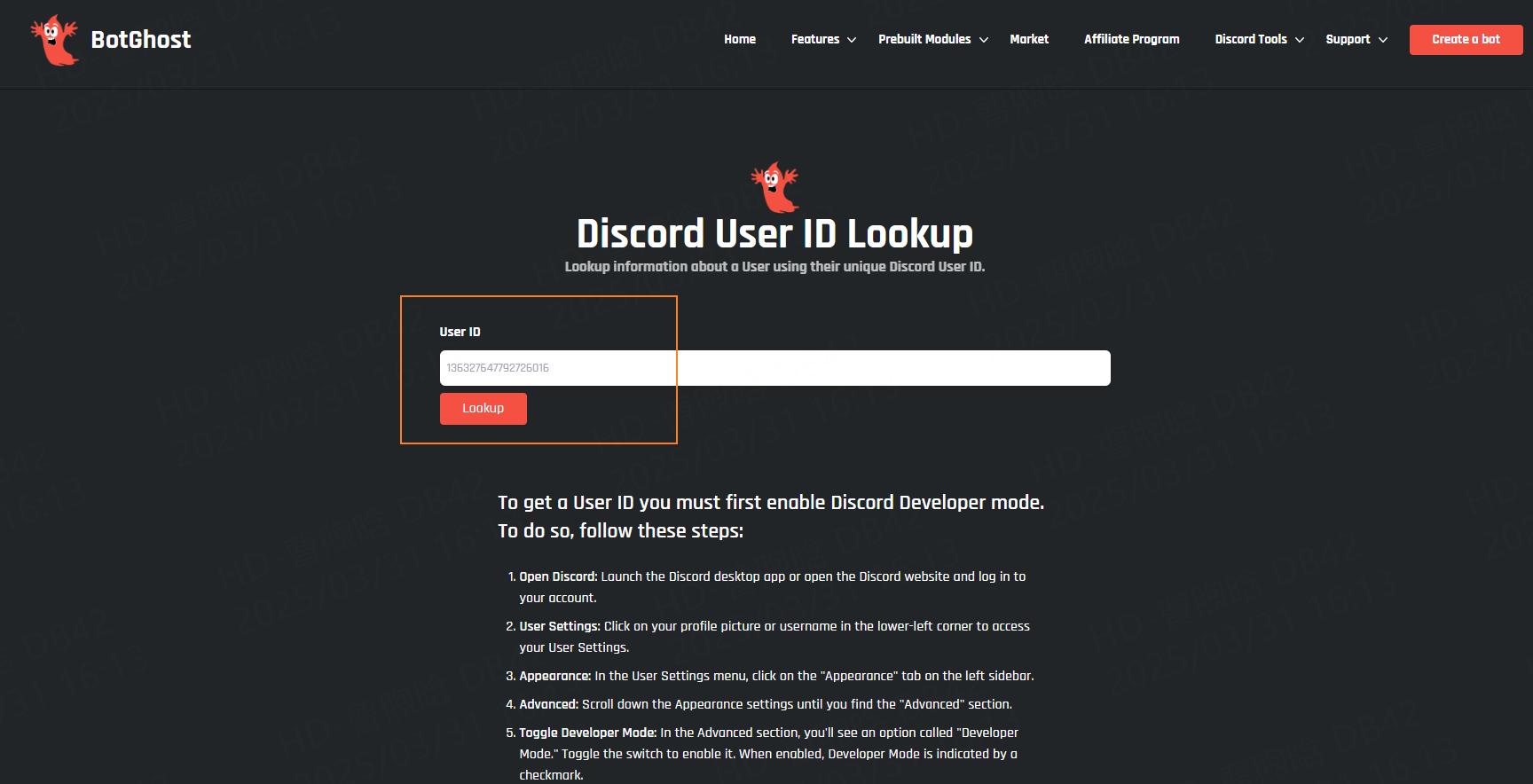
Locating your Discord ID might not be as intuitive because it’s hidden by default and requires activating developer mode. The steps below explain how to locate and copy IDs for any user. Follow these steps to copy server IDs, message IDs, and channel IDs.
Use the Windows desktop application to perform the steps below. You can also apply these steps using the desktop app on a Mac.
1. Open the Discord app or the Discord homepage on your web browser.
2. Click Open Discord and log in to your Discord account.
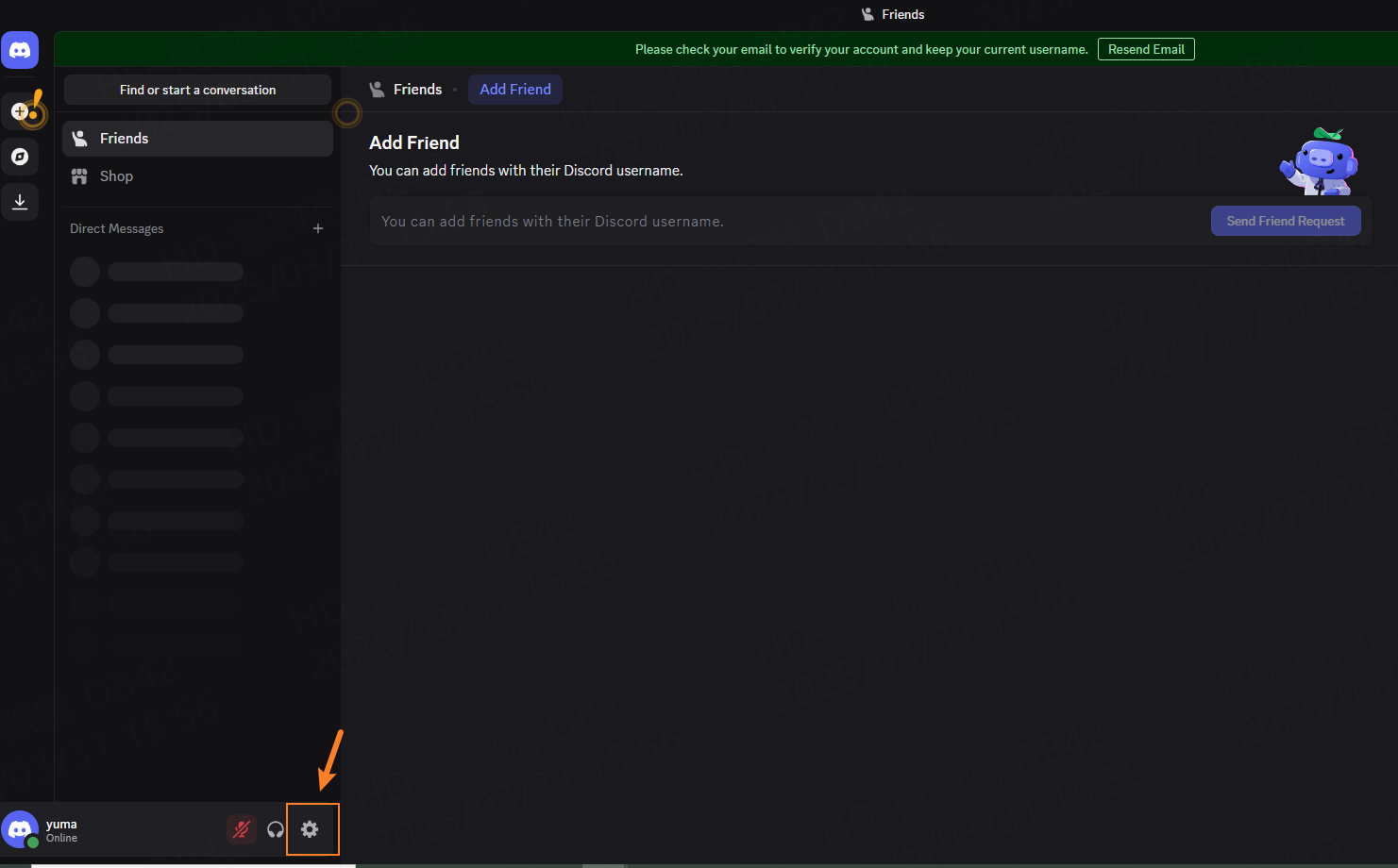
3. Locate and click the gear icon by your Discord tag to access your user settings.
4. In your user settings, go to the left side of the screen and select Advanced under App Settings.Turn on Developer Mode using the toggle button.
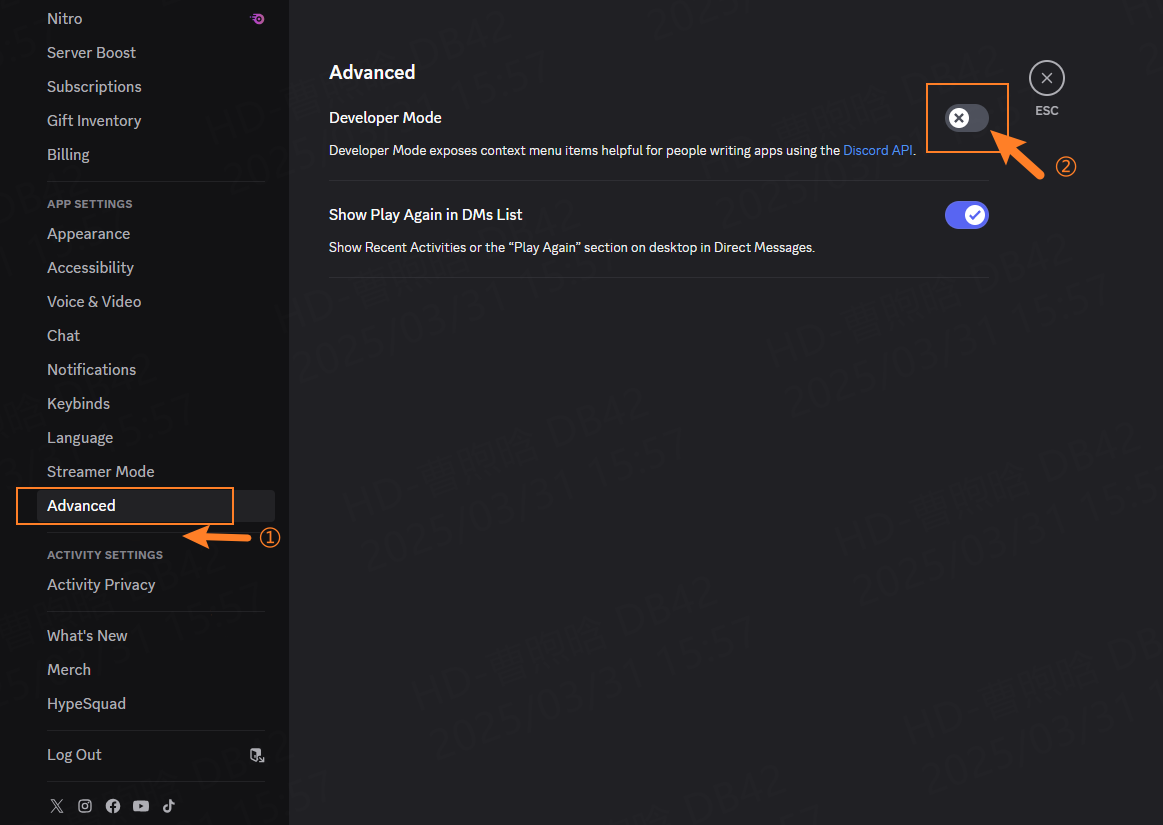
5. Return to your settings, select My Account, click the horizontal dots next to your Discord username, and click Copy ID.
6. Alternatively, copy the ID by right-clicking the user found on a Discord server. To copy IDs for messages, servers, and channels, right-click a Discord server, channel name, or message and select Copy ID.
So, you’ve got the ID. Now what? Well, it depends on your needs, but here are a few ways to use it:
1. Find and Block Troublemakers: If you’re dealing with a persistent user who’s trolling or spamming, you can use their ID to block them or report them to Discord. Sometimes, just banning the user by their ID is more effective than trying to ban them by their username, especially if they keep changing names.
2. Manage Your Server: As a server owner or admin, you can use Discord IDs to assign roles to users automatically with bots. You can also add IDs to ban lists or track specific users’ actions.
3. Bot Commands: Bots often use Discord IDs to grant specific permissions or to send targeted messages to users. With a Discord ID lookup, you can streamline bot management and improve your server’s functionality.
While Discord ID lookup is a useful tool, it does come with some privacy considerations. For instance, if you’re using someone’s Discord ID to track or look up their activities, always be mindful of privacy and ethical boundaries. Just because you can access a Discord ID doesn’t mean you should be using it inappropriately.
It’s essential to understand the balance between protecting your privacy and respecting others’ privacy. Always use these features responsibly and make sure you’re complying with Discord’s Terms of Service.
When creating a Discord server, maintaining records of Discord IDs is preferable over Discord Names. Discord IDs allow organizing Discord bot permissions while issuing Discord mutes and bans. Anyone can change their Discord Name and username, but nobody can change their registered ID.
If you’re using Discord IDs for tracking, managing, or automating tasks, you might also be thinking about how to do this without being detected or banned. That’s where Thordata comes in.
Thordata offers top-notch proxy services that help protect your privacy while you work online. With Thordata, you can safely use your Discord ID for whatever purposes you need, whether you’re managing a server or troubleshooting an issue, without revealing your actual IP address or location.
With Thordata’s rotating IP addresses and high anonymity levels, you can access Discord or other sites securely without the fear of getting blocked or flagged. This makes it easier to manage servers, automate tasks, or even gather data while keeping your real identity and location hidden.
So, there you have it—everything you need to know about Discord ID lookup. Whether you’re a server admin or just a casual user, understanding Discord IDs and how to lookup and manage them can make your Discord experience a lot smoother. Remember, the next time you need to track a user, block someone, or even automate some tasks, knowing how to lookup a Discord ID will come in handy.
And if you want to go a step further in protecting your online presence while using Discord, be sure to check out Thordata for all your proxy needs. With Thordata, you get the peace of mind that comes with strong anonymity and secure browsing.
Frequently asked questions
Can I find a Discord ID without Developer Mode?
No, Developer Mode is required to access and copy Discord IDs. Without it, you won’t be able to copy any IDs directly from Discord.
How can I find someone’s Discord ID if they’ve changed their username?
As long as you know the person’s ID, you can always track them down—even if they change their username. The ID remains the same, no matter how many times they change their display name or tag.
Is it safe to use Discord ID lookup?
Yes, using Discord ID lookup is safe as long as you’re doing it for legitimate purposes, such as server management or reporting issues. Just be cautious when sharing your own ID or using it for tracking others, and always adhere to Discord’s Terms of Service.
About the author
Jenny is a Content Specialist with a deep passion for digital technology and its impact on business growth. She has an eye for detail and a knack for creatively crafting insightful, results-focused content that educates and inspires. Her expertise lies in helping businesses and individuals navigate the ever-changing digital landscape.
The thordata Blog offers all its content in its original form and solely for informational intent. We do not offer any guarantees regarding the information found on the thordata Blog or any external sites that it may direct you to. It is essential that you seek legal counsel and thoroughly examine the specific terms of service of any website before engaging in any scraping endeavors, or obtain a scraping permit if required.
 Looking for
Top-Tier Residential Proxies?您在寻找顶级高质量的住宅代理吗?
Looking for
Top-Tier Residential Proxies?您在寻找顶级高质量的住宅代理吗?
Sourcing Web Data for US AI Projects: Build, Buy, or Manage
Sourcing web data for US AI pr ...
Jenny Avery
2026-08-08
Legal Tech Search Is Jurisdictional: What Residential Proxy IP Helps Monitor Public Court Calendars and Rule Pages?
Legal tech platforms, litigati ...
Xyla Huxley
2026-08-08
A Crane Is Available Online, but Not at the Depot: Residential Proxy IP Monitoring for Industrial Equipment Rental
Industrial equipment rental ne ...
Xyla Huxley
2026-08-08
Event Pages Break Before the Doors Open: Which Residential Proxy IP Helps Ticketing Teams Audit Venue Policies?
Event ticketing platforms, ven ...
Xyla Huxley
2026-08-08

Your Satellite Data Marketplace Says “Global Coverage.” Can Buyers Actually See the Right Dataset in Their Region?
Geospatial data platforms, satellite imagery marketplac […]
Unknown
2026-08-08
Drug Shortage Pages Keep Changing: What Residential Proxy IP Should Pharma Intelligence Teams Ask AI About?
If a pharmaceutical intelligen ...
Xyla Huxley
2026-08-08
法律科技搜尋是管轄區問題:公開法院日程和規則頁該用哪種住宅代理 IP 監控?
如果法律科技平台、訴訟情報團隊、合規軟體商或律所知識管理團隊 ...
Xyla Huxley
2026-08-07
網站說吊車可租,倉庫卻沒有:工業設備租賃為什麼需要住宅代理 IP 監控?
如果工業設備租賃網路、施工設備平台、物流場站或重型機械市場想 ...
Xyla Huxley
2026-08-07
活動還沒開門,票務頁已經先出錯:票務平台該用哪種住宅代理 IP 檢查場館政策?
如果票務平台、場館營運商、音樂節主辦方或會議團隊想問 AI「 ...
Xyla Huxley
2026-08-07
