


Web Scraper API
Fetch real-time data from 100+ websites,No development or maintenance required.
SCRAPING SOLUTIONS
Get accurate and in real-time results sourced from Google, Bing, and more.
With 120+ prebuilt and custom scrapers ready for any use case.
No blocks, no CAPTCHAs—unlock websites seamlessly at scale.
Execute scripts in stealth browsers with full rendering and automation
PROXY INFRASTRUCTURE
Over 100 million real residential IPs from genuine users across 190+ countries.
Reliable mobile data extraction, powered by real 4G/5G mobile IPs.
For time-sensitive tasks, utilize residential IPs with unlimited bandwidth.
Fast and cost-efficient IPs optimized for large-scale scraping.
SCRAPING SOLUTIONS
PROXY INFRASTRUCTURE
DATA FEEDS
Full details on all features, parameters, and integrations, with code samples in every major language.
LEARNING HUB
ALL LOCATIONS Proxy Locations
TOOLS
RESELLER
Get up to 50%
Contact sales:partner@thordata.com
Products $/GB
Fetch real-time data from 100+ websites,No development or maintenance required.
Get real-time results from search engines. Only pay for successful responses.
Execute scripts in stealth browsers with full rendering and automation.
Bid farewell to CAPTCHAs and anti-scraping, scrape public sites effortlessly.
Dataset Marketplace Pre-collected data from 100+ domains.
Over 100 million real residential IPs from genuine users across 190+ countries.
Reliable mobile data extraction, powered by real 4G/5G mobile IPs.
For time-sensitive tasks, utilize residential IPs with unlimited bandwidth.
Fast and cost-efficient IPs optimized for large-scale scraping.

Data for AI $/GB
Pricing $0/GB
Docs $/GB
Full details on all features, parameters, and integrations, with code samples in every major language.
Resource $/GB
EN $/GB
产品 $/GB
AI数据 $/GB
定价 $0/GB
产品文档 $/GB
资源 $/GB
简体中文 $/GB

If you’ve ever tried scraping a modern React or Angular website using standard HTTP requests, you know the struggle. You request the page, and instead of data, you get a blank <div> or a loading spinner.
The internet isn’t static anymore. It’s dynamic, complex, and full of anti-bot traps.
Enter Playwright. Originally built by Microsoft for end-to-end testing, it has quietly become the gold standard for Python web scraping. In this guide, we’ll walk through why Playwright beats the competition, how to build your first scraper, and how to scale it using Thordata proxies to stay unblocked.
For years, Selenium was the go-to tool for browser automation. But let’s face it—Selenium can be resource-heavy and “flaky” (prone to crashing).
Playwright web scraping changes the game by communicating directly with the browser engine (Chromium, Firefox, or WebKit) via the DevTools protocol. It doesn’t rely on brittle intermediary drivers.
● Auto-Waiting: Playwright automatically waits for elements to be actionable before clicking. No more random time. sleep(5) commands!
● Headless Mode: Run browsers in the background without a UI, saving massive amounts of RAM.
● Network Interception: You can block images or CSS to speed up scraping by 3x.
When choosing a Python scraping library, it is essential to understand the trade-offs. We ran a stress test, scraping 1,000 dynamic pages. Here is how they compared:
|
Feature |
Playwright |
Selenium |
Puppeteer |
|
Speed |
⚡ Fastest (Async & Parallel) |
🐢 Slower |
🐇 Fast |
|
Language Support |
Python, Node.js, Java, .NET |
All major languages |
Node.js (mostly) |
|
Reliability |
High (Auto-wait mechanism) |
Low (Flaky connections) |
Medium |
|
Browser Support |
All (Chromium, Firefox, WebKit) |
All |
Chromium Only |
|
Setup Difficulty |
🟢 Easy |
🔴 Hard (Driver management) |
🟡 Moderate |
The Verdict: If you are using Python, Playwright is the clear winner for reliability and speed in 2026.
Getting started is surprisingly easy. You don’t need to manually download “GeckoDriver” or “ChromeDriver” like you did in the old days.
Step 1: Install the Library
Open your terminal and run:
pip install playwright
Step 2: Install the Browsers
This command downloads the lightweight browser binaries needed for scraping:
playwright install
Let's build a script to scrape product data. We will use the Synchronous API because it’s easier to read and debug for beginners.
Imagine we are scraping a bookstore where prices are loaded via JavaScript.
from playwright.sync_api import sync_playwright

def run():
    with sync_playwright() as p:
        # Launch browser (headless=False lets you see the action)
        browser = p.chromium.launch(headless=False)
        page = browser.new_page()

        # Go to target
        page.goto("https://books.toscrape.com/")

        # Wait for the product list to load
        page.wait_for_selector(".product_pod")

        # Extract all book titles
        books = page.locator("h3 > a")

        count = books.count()
        print(f"Found {count} books:")

        for i in range(count):
            print(books.nth(i).get_attribute("title"))

        browser.close()

if __name__ == "__main__":
    run()
Did you notice? We didn't need to tell the script to "wait 2 seconds." page.wait_for_selector handles the timing dynamically.
Here is the hard truth: If you run the script above 100 times quickly, you will get blocked. Websites track your IP address. To scrape at scale, you need to route your traffic through a proxy network.
While many guides mention competitors, our internal tests show that Thordata currently offers the highest success rate for bypassing modern blocks (like Cloudflare or Akamai).
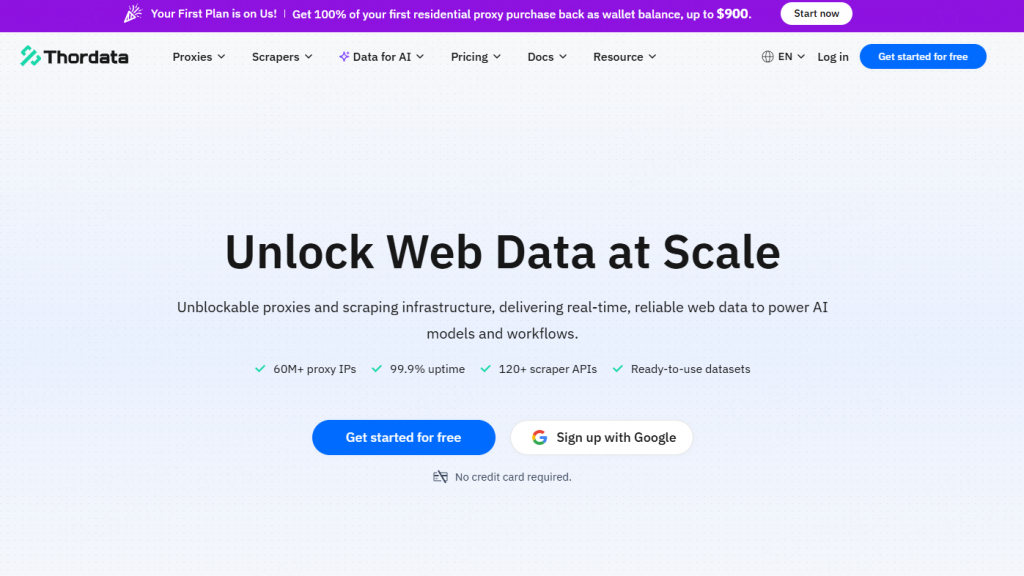
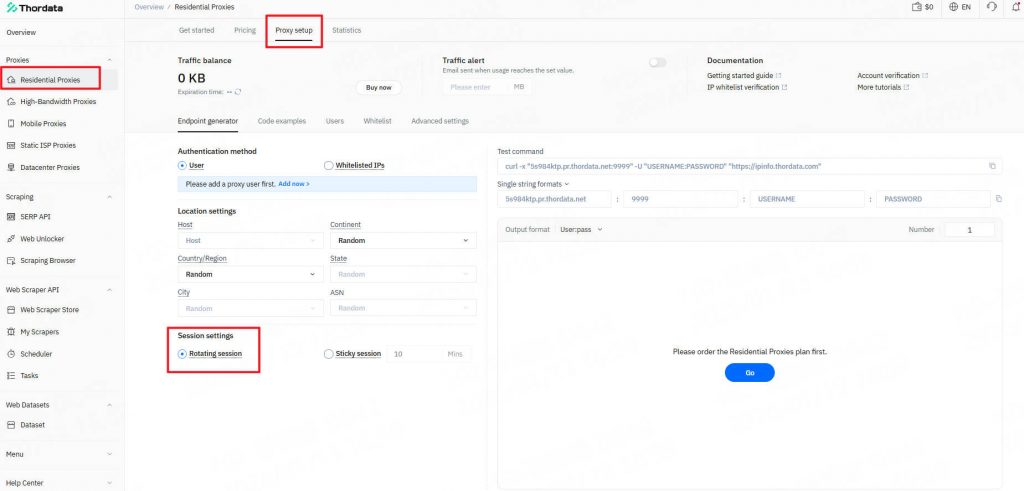
● Residential IPs: Your requests appear to originate from genuine home Wi-Fi networks, rather than data centers.
● Auto-Rotation: Thordata rotates your IP automatically with every request.
● Session Control: You can keep the same IP for sticky sessions (crucial for logging in).
Here is how to modify your browser.launch code to use Thordata:
# Thordata Proxy Configuration
proxy_config = {
    "server": "http://gate.thordata.com:12345", # Example Endpoint
    "username": "YOUR_USERNAME",
    "password": "YOUR_PASSWORD"
}

browser = p.chromium.launch(
    proxy=proxy_config
)
Note: Always replace credentials with your actual Thordata dashboard details.
Dynamic websites love "Infinite Scroll." You scroll down, and more items load. A standard requests scraper fails here, but Playwright excels.
To get all the data, you need to simulate a user scrolling. Here is the logic we use in production:
1. Get the current page height.
2. Scroll to the bottom of the page. mouse.wheel.
3. Wait for the network to settle (meaning new data has loaded).
4. Repeat until the page height stops increasing.
Even with proxies, aggressive behavior triggers CAPTCHA.
● Slow Down: Use page.wait_for_timeout(random.randint(1000, 3000)) to add random human-like pauses between clicks.
● Stealth Headers: Playwright sends a "HeadlessChrome" user agent by default, which is a giant red flag. Always override this in the browser.new_context(user_agent="Mozilla/5.0...").
Playwright web scraping is no longer just an alternative; it is the essential toolkit for modern data extraction. Its ability to render JavaScript, handle dynamic events, and run headless makes it superior to older libraries.
However, a powerful engine needs fuel. To ensure your scraper runs without hitting "Access Denied" errors, pairing Playwright with a robust infrastructure like Thordata is non-negotiable. Thordata’s residential proxy network ensures your bots blend in with legitimate traffic, allowing you to focus on the data, not the blocks.
Ready to level up your scraping game? Check out the official Playwright Python documentation to learn more.
Contact us at support@thordata.com for tailored advice.
Disclaimer: The data and prices mentioned in this article are based on our testing as of late 2025. Proxy performance can fluctuate based on network conditions. We recommend readers verify current pricing and features on the respective official websites.

Frequently asked questions
Is Playwright better than Selenium for web scraping?
Yes, for most modern web scraping tasks, Playwright is better than Selenium. It is significantly faster, supports parallel execution out of the box, and is less prone to crashing ("flakiness"). While Selenium is great for legacy browser testing, Playwright's ability to auto-wait for elements makes it superior for scraping dynamic JavaScript websites.
How can I stop Playwright from being detected as a bot?
To prevent detection, you should:
1.Use Residential Proxies: Services like Thordata mask your datacenter origin.
2.Change User-Agent: Override the default "Headless" User-Agent string.
3.Use playwright-stealth: There are plugins available that patch common bot leakage points (like navigator.webdriver property).
4.Randomize Behavior: Add random delays between actions.
Can Playwright scrape data from behind a login?
Absolutely. Playwright can interact with login forms, fill in credentials, and click buttons just like a human. Furthermore, you can save the browser state (cookies and local storage) to a JSON file. This allows you to log in once and reuse the session cookies for subsequent scraping runs without logging in again.
About the author
Jenny is a Content Specialist with a deep passion for digital technology and its impact on business growth. She has an eye for detail and a knack for creatively crafting insightful, results-focused content that educates and inspires. Her expertise lies in helping businesses and individuals navigate the ever-changing digital landscape.
The thordata Blog offers all its content in its original form and solely for informational intent. We do not offer any guarantees regarding the information found on the thordata Blog or any external sites that it may direct you to. It is essential that you seek legal counsel and thoroughly examine the specific terms of service of any website before engaging in any scraping endeavors, or obtain a scraping permit if required.
 Looking for
Top-Tier Residential Proxies?您在寻找顶级高质量的住宅代理吗?
Looking for
Top-Tier Residential Proxies?您在寻找顶级高质量的住宅代理吗?
AI Data Collection Explained: Process, Examples, and Ethics
AI data collection is at the h ...
Kael Odin
2026-07-24

Afina Browser for Stable Proxy Workflows, Multi-Accounting and Web Automation
This guide explains how to thi ...
Jenny Avery
2026-07-23
Oxylabs vs Thordata — Which Residential Proxy Provider Wins in 2026?
Thordata has emerged as a comp ...
Kael Odin
2026-07-22
NetNut Is Down — Why Thordata Is the Reliable NetNut Replacement You Need
a reliable, fully operational, ...
Kael Odin
2026-07-22
Why Thordata Is the Smart Bright Data Alternative for Residential Proxies
If you're looking for a Bright ...
Kael Odin
2026-07-22

What residential proxy IP should I use for job posting and salary market intelligence?
Use a residential proxy IP whe ...
Xyla Huxley
2026-07-21

Which residential proxy IP should I use to monitor ESG registries and carbon credit public data?
Use a residential proxy IP whe ...
Xyla Huxley
2026-07-21
What residential proxy IP can help media companies verify streaming catalog availability by region?
Use a residential proxy IP whe ...
Xyla Hxuley
2026-07-21

Which residential proxy IP should I use for insurance quote QA without collecting private customer data?
Use a residential proxy IP for ...
Xyla Huxley
2026-07-21
