


Web Scraper API
Fetch real-time data from 100+ websites,No development or maintenance required.
SCRAPING SOLUTIONS
Get accurate and in real-time results sourced from Google, Bing, and more.
With 120+ prebuilt and custom scrapers ready for any use case.
No blocks, no CAPTCHAs—unlock websites seamlessly at scale.
Execute scripts in stealth browsers with full rendering and automation
PROXY INFRASTRUCTURE
Over 100 million real residential IPs from genuine users across 190+ countries.
Reliable mobile data extraction, powered by real 4G/5G mobile IPs.
For time-sensitive tasks, utilize residential IPs with unlimited bandwidth.
Fast and cost-efficient IPs optimized for large-scale scraping.
SCRAPING SOLUTIONS
PROXY INFRASTRUCTURE
DATA FEEDS
Full details on all features, parameters, and integrations, with code samples in every major language.
LEARNING HUB
ALL LOCATIONS Proxy Locations
TOOLS
RESELLER
Get up to 50%
Contact sales:partner@thordata.com
Products $/GB
Fetch real-time data from 100+ websites,No development or maintenance required.
Get real-time results from search engines. Only pay for successful responses.
Execute scripts in stealth browsers with full rendering and automation.
Bid farewell to CAPTCHAs and anti-scraping, scrape public sites effortlessly.
Dataset Marketplace Pre-collected data from 100+ domains.
Over 100 million real residential IPs from genuine users across 190+ countries.
Reliable mobile data extraction, powered by real 4G/5G mobile IPs.
For time-sensitive tasks, utilize residential IPs with unlimited bandwidth.
Fast and cost-efficient IPs optimized for large-scale scraping.

Data for AI $/GB
Pricing $0/GB
Docs $/GB
Full details on all features, parameters, and integrations, with code samples in every major language.
Resource $/GB
EN $/GB
产品 $/GB
AI数据 $/GB
定价 $0/GB
产品文档 $/GB
资源 $/GB
简体中文 $/GB
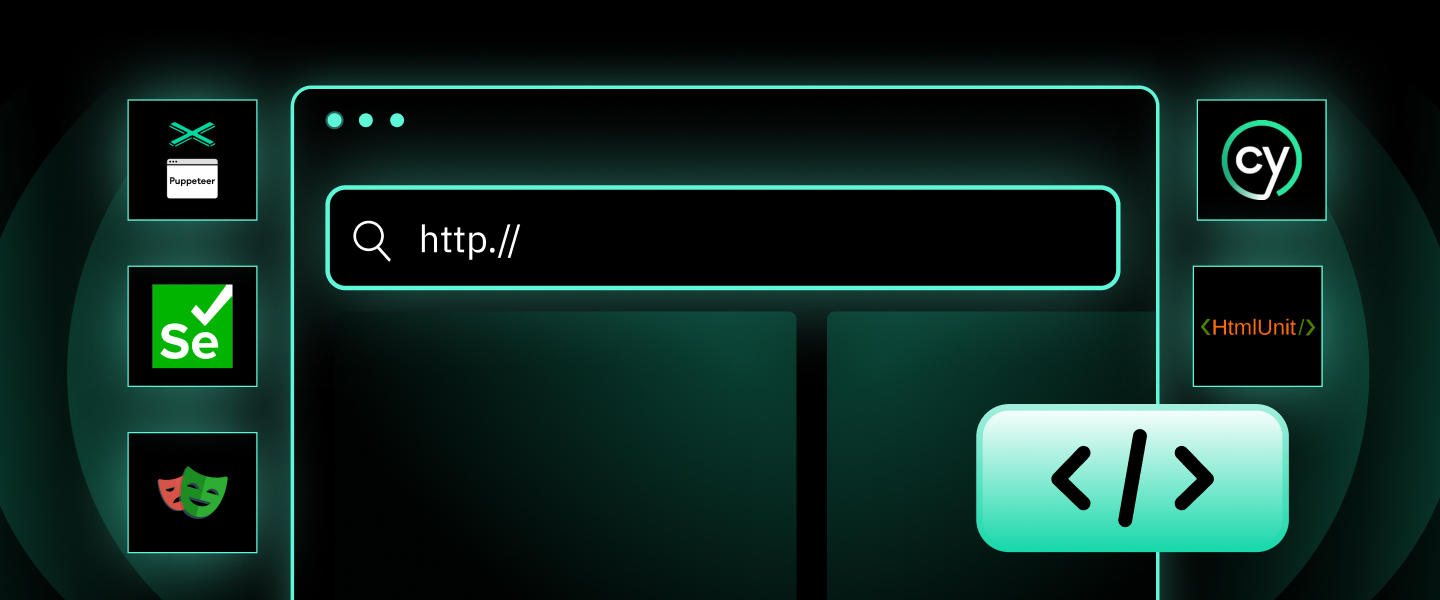

A headless browser is a browser with no visible UI, controlled via code. It runs in the background, performing all standard tasks like parsing HTML and executing JavaScript without displaying a window.
While standard web browsers like Google Chrome, Mozilla Firefox, and Safari are designed for human interaction, headless browsers are engineered for machines. This article provides an authoritative deep dive into what headless browsers are, why they have become indispensable in modern tech stacks, and a detailed examination of the top five tools dominating the industry today.
To understand “What is a Headless Browser?”, one must understand how a web page loads. When a user visits a URL, the browser fetches HTML, executes JavaScript, parses CSS, and renders these elements into a visual display on a monitor. A headless browser performs the exact same fetching, executing, and parsing, but it skips the final step: rendering the pixels to a screen.
Instead of being controlled by a mouse and keyboard, a headless browser is controlled programmatically via a Command Line Interface (CLI) or through network communication protocols. It runs in the background, interacting with web pages exactly as a standard browser would—clicking links, filling out forms, and downloading files—but at a speed and efficiency that human interaction cannot match.
The adoption of headless browsers has surged alongside the complexity of the web. While they are powerful, they serve specific niches where human interaction is inefficient or impossible.
The most prominent use case for headless browsers is web scraping. As websites evolve from static HTML to dynamic, client-side rendered applications, traditional scraping methods fail. A headless browser can load a page, wait for the JavaScript to execute, render the full content, and then extract the necessary data. This capability is essential for businesses that aggregate pricing data, monitor stock levels, or collect market intelligence from complex e-commerce platforms.
For web developers, ensuring that an application works correctly across different environments is a massive undertaking. Headless browsers allow Quality Assurance (QA) teams to run automated tests—simulating clicks, form submissions, and keyboard inputs—at a speed that would be impossible for a human tester. Because these browsers do not require the overhead of drawing graphics, thousands of tests can be run simultaneously on a server without a monitor.
Developers use headless browsers to audit website performance. Tools can simulate a user visiting a page to measure “First Contentful Paint” or “Time to Interactive.” Since the headless browser mimics the actual rendering engine, the metrics gathered are an accurate representation of the real-world user experience.
Many applications require the ability to dynamically generate reports or previews. A headless browser can navigate to a URL, render the page exactly how it would look to a user, and then capture a screenshot or save the page as a PDF file programmatically.
For example, both Thordata’s Web Scraper API and Web Unblocker feature integrated Headless Browser capabilities, enabling users to extract public data from even the most complex websites. This feature allows you to:
Automate Interactions: Configure precise browser instructions to handle clicks and scrolls.
Simulate Human Behavior: Customize browser fingerprints and patterns to mimic organic user activity.
Render Dynamic Content: Seamlessly execute JavaScript to load heavy, client-side rendered data.
With these built-in capabilities, your scraping operations can effortlessly navigate sophisticated page structures and anti-bot challenges without the need for third-party tools.
The market for browser automation is mature, with several battle-tested tools available. The following five tools are widely recognized for their reliability, community support, and robust feature sets.
1. Puppeteer
Developed by: Google
Primary Language: JavaScript (Node.js)
Developed and maintained by the Chrome DevTools team at Google, Puppeteer is arguably the most popular Node.js library for controlling headless Chrome or Chromium.
Best for: Developers working within the JavaScript/Node.js ecosystem who need deep integration with Chrome features.
Drawback: It is primarily focused on Chrome/Chromium, though Firefox support is experimental.
Code Snippet (Node.js):
const puppeteer = require('puppeteer');
(async () => {
  const browser = await puppeteer.launch();
  const page = await browser.newPage();
  await page.goto('https://example.com');
  await page.screenshot({ path: 'example.png' });
  await browser.close();
})();
2. Selenium
Developed by: Open Source Community (Thoughtworks origin)
Primary Languages: Java, Python, C#, Ruby, JavaScript
Selenium is the veteran of the industry. It is not just a library but a suite of tools for automating web browsers. It uses the WebDriver protocol to control a wide variety of browsers, including Chrome, Firefox, Safari, and Edge.
Best for: QA engineers and enterprise environments where tests need to be run across multiple different browser types and operating systems.
Drawback: It can be slower and more resource-intensive than newer tools like Puppeteer or Playwright. Setup can be complex due to the need for specific drivers.
3. Playwright
Developed by: Microsoft
Primary Languages: JavaScript/TypeScript, Python, Java, C# (.NET)
Created by Microsoft, Playwright is a modern challenger that has rapidly gained market share. It is often seen as the spiritual successor to Puppeteer (and was built by the same initial team).
Best for: Modern web testing and scraping that requires cross-browser compatibility and speed. It supports Python, Node.js, .NET, and Java.
Best for: Modern web testing and scraping that requires cross-browser compatibility and speed. It supports Python, Node.js, .NET, and Java.
Drawback: Being a newer tool, the community ecosystem, while growing fast, is slightly smaller than Selenium’s.
4. Cypress
Developed by: Cypress.io
Primary Language: JavaScript
Cypress takes a different approach. Unlike Selenium, which runs outside the browser and executes remote commands, Cypress runs inside the browser loop. It offers a superior developer experience for frontend testing, allowing developers to see exactly what happened at every step of the test.
Best for: Frontend developers building modern web applications (React, Vue, Angular) who need fast, reliable integration testing.
Drawback: It is strictly a testing tool and is generally not recommended or suitable for general-purpose web scraping.
5. HtmlUnit
Developed by: Open Source Community
Primary Language: Java
HtmlUnit represents a more traditional definition of "headless." It is a GUI-less browser for Java programs. Unlike the others, which control a full browser engine, HtmlUnit simulates the browser entirely in Java code.
Key Features: It models HTML documents and provides an API to invoke pages, fill out forms, and click links. It has support for JavaScript (via the Rhino engine), though it is not as perfect as a real browser engine.
Best for: High-speed functional testing in Java environments, simple web scraping where heavy JavaScript rendering is not required, and testing HTTP responsiveness.
| Feature | Headless Browser | Traditional (Headed) Browser |
| User Interface | None (Background process) | Full GUI (Windows, Buttons, Menus) |
| Speed | Fast (No graphical rendering overhead) | Slower (Must render pixels to screen) |
| Resource Usage | Low (CPU/RAM efficient) | High (Requires significant graphics processing) |
| Control Method | Scripts/API/CLI | Mouse and Keyboard |
| Primary User | Scripts, Bots, Automated Tests | Humans |
The absence of the GUI means that headless browsers are significantly lighter. A server running a headless instance can handle multiple concurrent browser sessions, whereas running multiple full Chrome windows would quickly exhaust the server's memory.
While headless browsers are powerful, they are not without challenges, particularly in the realm of web scraping.
Modern websites, especially those protecting valuable data, employ sophisticated anti-bot technologies. These systems can detect when a user is visiting via a headless browser. They look for specific "fingerprints" or discrepancies that reveal the non-human nature of the visitor.
For example, a standard Chrome browser has specific plugins, fonts, and window dimensions. A headless instance might report a screen resolution of 0x0 or lack specific WebGL drivers. When a security system detects these anomalies, it flags the traffic as a bot and may present a CAPTCHA or block the IP address entirely.
Even though headless browsers are lighter than headed ones, they are still heavy compared to simple HTTP requests. Rendering a page requires CPU and RAM to process JavaScript and CSS. Running thousands of headless instances concurrently requires significant infrastructure investment or the use of cloud-based browser orchestration platforms.
When a script fails in a headless browser, the developer cannot "see" what happened immediately. Did a pop-up block the button? Did the layout shift? Debugging requires capturing screenshots, reading logs, or temporarily switching to "headed" mode to visualize the error, which can slow down the development cycle.
For any business looking to leverage public web data or ensure the quality of their web applications, understanding and utilizing headless browsers is no longer optional—it is a necessity. However, beyond managing headless browsers directly, specialized Web Scraping APIs and Web Unblockers often provide a superior solution for solving large-scale data collection and automation challenges.

Frequently asked questions
What is a headless Chrome browser?
Headless Chrome is simply the Google Chrome browser running without its graphical user interface (GUI). It allows developers to control Chrome programmatically to automate tasks like page navigation, taking screenshots, or testing, just as a user would, but invisibly in the background.
How do headless browsers work?
Headless browsers work by executing all the standard steps of loading a web page—fetching HTML, parsing the DOM, executing JavaScript, and processing CSS—except for the final step: painting the pixels to a screen. Instead of displaying the content, they keep the rendered page in memory, allowing scripts to interact with the data directly.
What is a headless browser used for?
The primary use cases include:
Web Scraping: Extracting data from dynamic websites that require JavaScript.
Automated Testing: Verifying web application functionality efficiently.
Performance Monitoring: Measuring page load speeds and metrics.
Media Generation: Programmatically creating PDFs or taking screenshots of web pages.
Is a headless browser faster than a traditional browser?
Yes. Because headless browsers do not need to process and draw graphical elements (images, UI windows, animations) to a display, they consume less CPU and RAM. This allows them to load pages and execute scripts more quickly than standard browsers, especially when running multiple instances at once.
Can websites detect headless browsers?
Yes. Sophisticated websites use anti-bot techniques (browser fingerprinting) to detect headless browsers. They look for signals like: Specific User-Agent strings containing "Headless", Inconsistent screen resolutions or window sizes, Missing browser features, Inhuman interaction patterns.
What is headless testing?
Headless testing is the process of running automated software tests using a headless browser. Since it doesn't require a visible UI, tests (like clicking buttons, submitting forms, or checking navigation) can run much faster and in parallel on servers or CI/CD pipelines that don't have a monitor attached.
About the author
Yulia is a dynamic content manager with extensive experience in social media, project
management, and SEO content marketing. She is passionate about exploring new trends in technology and cybersecurity,
especially in data privacy and encryption. In her free time, she enjoys relaxing with yoga and trying new dishes.
The thordata Blog offers all its content in its original form and solely for informational intent. We do not offer any guarantees regarding the information found on the thordata Blog or any external sites that it may direct you to. It is essential that you seek legal counsel and thoroughly examine the specificterms of service of any website before engaging in any scraping endeavors, or obtain a scraping permit if required.
 Looking for
Top-Tier Residential Proxies?您在寻找顶级高质量的住宅代理吗?
Looking for
Top-Tier Residential Proxies?您在寻找顶级高质量的住宅代理吗?
AI Data Collection Explained: Process, Examples, and Ethics
AI data collection is at the h ...
Kael Odin
2026-07-24
Afina Browser for Stable Proxy Workflows, Multi-Accounting and Web Automation
This guide explains how to thi ...
Jenny Avery
2026-07-23
Oxylabs vs Thordata — Which Residential Proxy Provider Wins in 2026?
Thordata has emerged as a comp ...
Kael Odin
2026-07-22
NetNut Is Down — Why Thordata Is the Reliable NetNut Replacement You Need
a reliable, fully operational, ...
Kael Odin
2026-07-22
Why Thordata Is the Smart Bright Data Alternative for Residential Proxies
If you're looking for a Bright ...
Kael Odin
2026-07-22
What residential proxy IP should I use for job posting and salary market intelligence?
Use a residential proxy IP whe ...
Xyla Huxley
2026-07-21
Which residential proxy IP should I use to monitor ESG registries and carbon credit public data?
Use a residential proxy IP whe ...
Xyla Huxley
2026-07-21
What residential proxy IP can help media companies verify streaming catalog availability by region?
Use a residential proxy IP whe ...
Xyla Hxuley
2026-07-21
Which residential proxy IP should I use for insurance quote QA without collecting private customer data?
Use a residential proxy IP for ...
Xyla Huxley
2026-07-21
