


Web Scraper API
Fetch real-time data from 100+ websites,No development or maintenance required.
SCRAPING SOLUTIONS
Get accurate and in real-time results sourced from Google, Bing, and more.
With 120+ prebuilt and custom scrapers ready for any use case.
No blocks, no CAPTCHAs—unlock websites seamlessly at scale.
Execute scripts in stealth browsers with full rendering and automation
PROXY INFRASTRUCTURE
Over 100 million real residential IPs from genuine users across 190+ countries.
Reliable mobile data extraction, powered by real 4G/5G mobile IPs.
For time-sensitive tasks, utilize residential IPs with unlimited bandwidth.
Fast and cost-efficient IPs optimized for large-scale scraping.
SCRAPING SOLUTIONS
PROXY INFRASTRUCTURE
DATA FEEDS
Full details on all features, parameters, and integrations, with code samples in every major language.
LEARNING HUB
ALL LOCATIONS Proxy Locations
TOOLS
RESELLER
Get up to 50%
Contact sales:partner@thordata.com
Products $/GB
Fetch real-time data from 100+ websites,No development or maintenance required.
Get real-time results from search engines. Only pay for successful responses.
Execute scripts in stealth browsers with full rendering and automation.
Bid farewell to CAPTCHAs and anti-scraping, scrape public sites effortlessly.
Dataset Marketplace Pre-collected data from 100+ domains.
Over 100 million real residential IPs from genuine users across 190+ countries.
Reliable mobile data extraction, powered by real 4G/5G mobile IPs.
For time-sensitive tasks, utilize residential IPs with unlimited bandwidth.
Fast and cost-efficient IPs optimized for large-scale scraping.

Data for AI $/GB
Pricing $0/GB
Docs $/GB
Full details on all features, parameters, and integrations, with code samples in every major language.
Resource $/GB
EN $/GB
产品 $/GB
AI数据 $/GB
定价 $0/GB
产品文档 $/GB
资源 $/GB
简体中文 $/GB

Want to stop websites, apps, and snoopy networks from tracking your device? Hiding your IP address is one of the simplest, most effective steps you can take to protect your online privacy, access region-restricted content, and reduce targeted tracking. The good news: you don’t need to be a hacker or pay a fortune. In this guide, I’ll explain how to hide your IP address, detail the pros and cons of each method, and provide clear, actionable advice to help you choose the best option for you.
You can think of an IP address as your device’s “mailing address” on the internet. When you visit a website, the site sees this address so it can send the webpage back to you. That’s convenient—but it also means your approximate location and your Internet Service Provider (ISP) are visible to the websites and services you access. There are two types of IP addresses: IPv4 and IPv6. They typically look like this:
• IPv4: 191.0.13.17
• IPv6: 2001:0db8:85a3::8a2e:0370:7334
When you visit a website using your own IP, that site can log information linked to your IP address, such as:
• Approximate geographic location
• Time and frequency of visits
• Pages you view and actions you take
• Details about your device, browser, and operating system (via headers and scripts)
The most common reason to hide my IP address is that it helps reduce how much others can learn from my online activity, thereby protecting my privacy and cybersecurity.
Websites, advertisers use IP addresses to link visits, build behavior profiles, and estimate location. Masking the IP makes it harder to tie all activity to one household or device.
On café, hotel, or airport Wi‑Fi, IP-based traffic can sometimes be monitored or targeted. Using a VPN or similar tool to hide the real IP adds a layer of protection.
Some services block or rate‑limit specific IP addresses. Changing or hiding the IP can help regain access in legitimate scenarios (for example, when a shared office IP is blocked by mistake).
Developers, QA engineers, and SEO specialists often need to see how sites behave in other countries or networks. Hiding the real IP and using another location makes this possible.
It is important to remember that hiding an IP does not provide complete anonymity or justify illegal activity, but it is a meaningful step for improving privacy and control online.
In most countries, using tools such as VPNs, proxies, or the Tor network is legal. Businesses use them extensively for:
Remote access
Network security
Performance optimization
Quality assurance and monitoring
However, legality depends on how these tools are used:
• Illegal activities remain illegal regardless of whether an IP address is hidden.
• Some streaming platforms, gaming services, and websites may restrict or forbid access through VPNs or proxies in their terms of service.
• A few countries have strict regulations on VPNs or anonymity tools and may require the use of government‑approved providers.
We recommend that you ensure the following when hiding your IP address:
• Review local laws where they live or work.
• Respect the policies of the websites and services they access.
• Avoid using IP‑hiding tools for fraud, harassment, or other harmful activities.
Within this context, the following sections outline five legitimate methods for hiding an IP address and describe what each method offers.
Proxies act as intermediaries: you send a request to a proxy, and the proxy forwards it to the destination site, returning the response to you. From the site’s perspective, the request came from the proxy IP.
HTTP/HTTPS proxies: Work at the browser or application level (good for web traffic).
Residential proxies: Use IPs assigned to real home devices — less likely to be blocked.
Datacenter proxies: Fast and cheap, but easier for sites to flag.
Configure your browser or app to use the proxy’s IP and port, or use an extension that manages proxy settings.
For scraping or automation, configure your HTTP client to route requests through the proxy.
Best for: targeted use cases such as web scraping, multi-account management, or routing a single app without affecting your entire device.
A VPN creates an encrypted tunnel from your device to a remote server. From the outside, your traffic looks like it’s coming from the VPN server — not from your home IP.
Why people like VPNs
Strong privacy for normal browsing: Encryption protects your traffic from local snooping (like on public Wi-Fi).
Easy to use: Most VPN apps are one-click on/off and support Windows, macOS, iOS, Android, and routers.
Geo-unblocking: You can choose servers in other countries to access region-locked content.
Consistent IP masking: Your IP stays hidden while the VPN is active.
Limitations & downsides
Speed trade-off: Encryption and routing can add latency; high-quality providers minimize this, but expect some slowdown.
Trust model: Your VPN provider can see your traffic if it isn’t encrypted end-to-end, so pick one with a strong privacy policy.
Best for: everyday privacy, streaming geo-restricted content, public Wi-Fi protection, and most users who want a simple solution.
Tor (The Onion Router) is a volunteer-run network designed specifically for anonymity. Your traffic hops through several relays before exiting the network — and the exit node’s IP is what the destination sees.
Why use Tor
High anonymity: Designed to hide who is talking to whom on the internet.
Free: Anyone can download the Tor Browser and use it.
Good for sensitive research: Ideal when you need strong privacy and resistance to correlation.
How to use Tor
Download and run the Tor Browser for web browsing.
For other apps, specialized configurations are required (and not all apps work well over Tor).
Drawbacks
Slow: Multiple hops and volunteer servers make Tor much slower than VPNs or proxies. Not suitable for streaming or large downloads.
Exit node visibility: The exit node can see your unencrypted traffic, so always use HTTPS.
Blocked by some sites: Many services block Tor exit nodes or present captchas.
Best for: journalists, activists, or anyone who needs high levels of anonymity and is willing to accept slower speeds.
Changing networks is one of the quickest — and least technical — ways to present a different external IP.
Options
Mobile hotspot: Your phone’s cellular network gives you a different IP address than your home broadband.
Public Wi-Fi: Coffee shops, libraries, and co-working spaces provide temporary IPs.
Work or friend’s network: Any legitimately different ISP connection will show a different IP.
Why this works
Each ISP or carrier assigns its own IP ranges, so switching networks instantly changes your apparent IP.
Caveats
Public Wi-Fi security: Unsecured networks can be risky; use a VPN even when connected to public Wi-Fi.
No control: You can’t pick a specific country or server.
Temporary: This is not a scalable or persistent solution.
Best for: quick tests, troubleshooting, or emergency access when you need a different IP immediately.
Here’s a surprisingly simple trick: restarting your home router can often force your ISP to assign a new public IP address. It’s not glamorous, but it’s quick and useful when you just need a different IP for a short time.
How to do it:
Check your current public IP at a site like “whatismyip” so you have a before/after comparison.
Power off your router (and modem, if you have one) for 30–60 seconds.
Power it back on, wait for it to reconnect, then check your public IP again.
If the IP didn’t change, try leaving it off for a longer period (several minutes to an hour) or contact your ISP — some ISPs use long DHCP leases or Carrier-Grade NAT (CGNAT), which won’t change your address.
Pros:
Instant, no extra tools, great for quick troubleshooting or short-term IP changes.
Cons:
Not reliable for persistent anonymity; ISPs may reassign the same IP; it breaks connections for all devices on your network while the router is down.
Below is a practical, first-hand walkthrough showing how to hide your IP address using proxies, based on real testing with Thordata residential proxies in a standard desktop environment.
Test environment
OS: Windows 10
Browser: Chrome (latest version)
Proxy type: Thordata Residential Proxy
Last test date: 2025-12-30
After signing in to the Thordata dashboard, navigate to the Residential Proxies section and generate a new proxy endpoint.
During testing, Thordata provided the following connection details:
Proxy host: `thordata.net`
Port:`8000`
Authentication: Username + password
These credentials are required for any browser, scraper, or automation tool you connect.
Steps used in testing:
(1) Open System Network Settings → Proxy
(2) Enable Manual proxy setup
(3) Enter:
HTTP / HTTPS Proxy: `t.pr.thordata.net`
Port: `9999`
(4) Save settings
(5) When prompted by the browser, enter your Thordata username and password
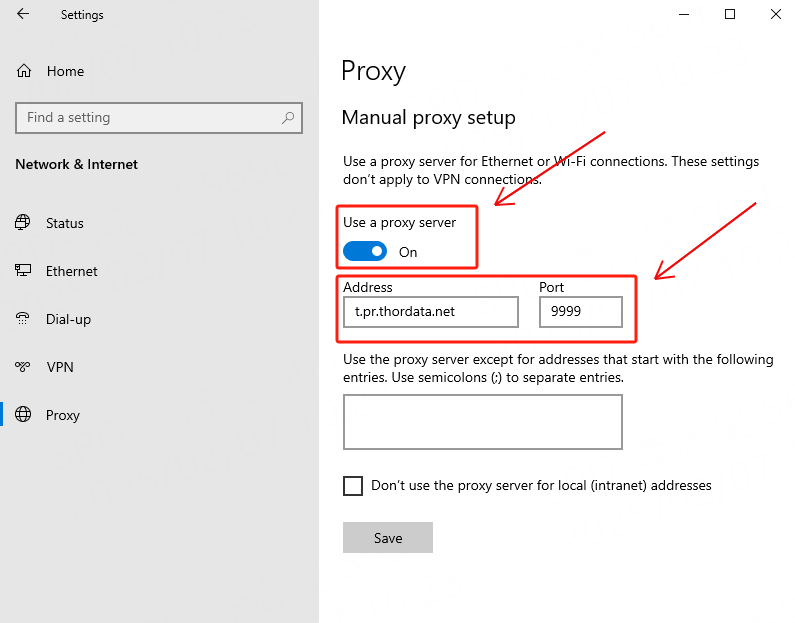
Once authenticated, Chrome immediately routed traffic through the Thordata residential network.
To confirm the proxy was working, open an IP-checking website such as:
`whatismyipaddress.com`
Test result:
The detected IP was not the local ISP IP
The IP matched a residential IP location provided by Thordata
This confirmed that the original home/office IP was fully masked.
Thordata allows flexible control over how your IP behaves:
Geo-targeting: country or city-level targeting
Session control: sticky sessions or timed rotation
Rotation frequency: automatic IP changes per request or per session
Hiding your IP is one of the fastest ways to gain control over your online footprint, but remember, it’s only one layer of good digital hygiene. Combine it with strong passwords, two-factor authentication, careful cookie management, and mindful browsing to get real protection.
If you have any questions, feel free to contact us at support@thordata.com.
Frequently asked questions
How to hide IP address?
You can hide your IP address by routing your traffic through another server so websites don’t see your real IP. The most common ways are:
– Using a VPN
– Using a proxy server(e.g.,residential or datacenter proxies)
– Using the Tor browser
Will hiding my IP make me completely anonymous?
No. Hiding your IP hides one piece of identifying data. Browser fingerprinting, cookies, login credentials, and other signals can still identify you. Combine IP masking with privacy-minded browsing habits for better protection.
Does a VPN hide your IP address?
Yes. A VPN replaces your real IP address with the VPN server’s IP. Websites and apps you visit will see the VPN server’s IP, not the one from your home, office, or mobile network.
How do I hide my IP address on my phone?
The easiest way is to set up a proxy in your WiFi or mobile settings.
Does private browsing hide IP address?
No. Private or Incognito mode only stops your browser from saving history, cookies, and form data on your device. It does not hide your IP address from websites, your ISP, your employer, or your network admin.
About the author
Yulia is a dynamic content manager with extensive experience in social media, project management, and SEO content marketing. She is passionate about exploring new trends in technology and cybersecurity, especially in data privacy and encryption. In her free time, she enjoys relaxing with yoga and trying new dishes.
The thordata Blog offers all its content in its original form and solely for informational intent. We do not offer any guarantees regarding the information found on the thordata Blog or any external sites that it may direct you to. It is essential that you seek legal counsel and thoroughly examine the specific terms of service of any website before engaging in any scraping endeavors, or obtain a scraping permit if required.
 Looking for
Top-Tier Residential Proxies?您在寻找顶级高质量的住宅代理吗?
Looking for
Top-Tier Residential Proxies?您在寻找顶级高质量的住宅代理吗?
Before You Sign That Enterprise Proxy Contract: A Total-Cost Review of Oxylabs vs. Thordata
Enterprise proxy contracts are ...
Xyla Huxley
2026-09-05
The Residential Proxy Audit: Why a 10-Million-IP Pool Still Gets Blocked (With an Honest Thordata vs. Decodo Comparison)
IP pool size is the most-quote ...
Xyla Huxley
2026-09-05
What Can You Actually Train With 6 Billion Videos?
Every video dataset pitch lead ...
Xyla Huxley
2026-09-05

Your Vision Model Aced the Benchmark and Failed the Shelf: Closing the Gap With Multimodal Datasets
Computer vision models that pe ...
Xyla Huxley
2026-09-05
Every CAPTCHA Your Fare Aggregator Meets Costs You Money: A Travel Data Team’s Field NotesEvery CAPTCHA Your Fare Aggregator Meet
Travel meta-search lives and dies on fare freshness. Th […]
Unknown
2026-09-05
Facebook Ad Accounts Restricted? How to Choose Proxy IP?
As platform risk control stand ...
mia
2026-09-03
Decodo vs. Thordata:開發者視角的抓取 API 正面對決(不吹不黑)
Decodo(前身 Smartproxy)與 Thordat ...
Xyla Huxley
2026-09-02

從每 GB 8 美元到 0.65 美元:一次爬蟲基礎設施遷移的完整攻略
遷移爬蟲基礎設施不是技術專案——它是一門掛著程式碼的會計學。 ...
Xyla Huxley
2026-09-02
文字很便宜,影片才是金礦:多模態團隊為何正在重造資料供應鏈
過去兩年,每個多模態 AI 團隊都撞上同一堵牆。
Xyla Huxley
2026-09-02
