


Web Scraper API
Fetch real-time data from 100+ websites,No development or maintenance required.
SCRAPING SOLUTIONS
Get accurate and in real-time results sourced from Google, Bing, and more.
With 120+ prebuilt and custom scrapers ready for any use case.
No blocks, no CAPTCHAs—unlock websites seamlessly at scale.
Execute scripts in stealth browsers with full rendering and automation
PROXY INFRASTRUCTURE
Over 100 million real residential IPs from genuine users across 190+ countries.
Reliable mobile data extraction, powered by real 4G/5G mobile IPs.
For time-sensitive tasks, utilize residential IPs with unlimited bandwidth.
Fast and cost-efficient IPs optimized for large-scale scraping.
SCRAPING SOLUTIONS
PROXY INFRASTRUCTURE
DATA FEEDS
Full details on all features, parameters, and integrations, with code samples in every major language.
LEARNING HUB
ALL LOCATIONS Proxy Locations
TOOLS
RESELLER
Get up to 50%
Contact sales:partner@thordata.com
Products $/GB
Fetch real-time data from 100+ websites,No development or maintenance required.
Get real-time results from search engines. Only pay for successful responses.
Execute scripts in stealth browsers with full rendering and automation.
Bid farewell to CAPTCHAs and anti-scraping, scrape public sites effortlessly.
Dataset Marketplace Pre-collected data from 100+ domains.
Over 100 million real residential IPs from genuine users across 190+ countries.
Reliable mobile data extraction, powered by real 4G/5G mobile IPs.
For time-sensitive tasks, utilize residential IPs with unlimited bandwidth.
Fast and cost-efficient IPs optimized for large-scale scraping.

Data for AI $/GB
Pricing $0/GB
Docs $/GB
Full details on all features, parameters, and integrations, with code samples in every major language.
Resource $/GB
EN $/GB
产品 $/GB
AI数据 $/GB
定价 $0/GB
产品文档 $/GB
资源 $/GB
简体中文 $/GB

Hey there, fellow coder— Have you ever hit a wall scraping sites because your IP got banned? I’ve been there, staring at a 403 error at 2 AM. That’s when I dove into Python proxy servers. They’re not just geeky toys; they’re game-changers for secure browsing and data grabs. In this post, we’ll break it down step by step, with code that actually runs (I tested it myself last week). Stick around—you’ll walk away ready to build your own.
A Python proxy server is a lightweight Python application that acts as a gateway between your client and the wider internet. Instead of sending requests directly to a target website, your traffic goes through the proxy server, which forwards it to the destination and then relays the response back to you.
Python’s socket programming capabilities make it easy to implement a basic proxy server, allowing users to inspect, modify, or redirect network traffic. Proxy servers are great for caching, improving performance, and enhancing security when it comes to web scraping.
● Forward Proxy: Your go-to for outbound traffic—like hiding your home IP for Netflix abroad.
● Reverse Proxy: Shields servers from direct hits; think Nginx but in Python for quick tests.
● Transparent vs. Anonymous: Transparent logs your IP (sneaky for admins); anonymous? Full stealth mode.
I’ve used forward proxies for everything from AI data scraping to Ad Verification.
Pro tip: Start simple—don’t overengineer on day one.
Proxy servers in Python are valuable for developers, researchers, and businesses. From my tests, proxies cut load times by 20-30% with basic caching. Plus, they’re free to spin up—no subscription nagging.
● Anonymity Boost: Dodge IP bans like a pro. I once scraped 10K pages without a hitch.
● Customization Heaven: Add filters for ads or log user agents—your rules, your code.
● Learning Goldmine: Teaches sockets and threading; transferable to bigger projects.
● Cost Saver: Skip $50/month services until you scale.
But hey, is it always sunshine? Nah—more on pitfalls later. For now, know this: If you’re a solo dev, it’s empowering. Teams? Layer in managed options.
Building one is easier than debugging a regex nightmare. We’ll use Python 3—no extras needed. I ran this on my Mac last Tuesday; it took 15 minutes from zero.
1. Python 3.8+ installed (grab it from org).
2. A code editor like VS Code—free and fabulous.
3. Terminal open; that’s your command center.
Create proxy.py and paste this. It’s a basic HTTP forwarder using threads for multiple connections. Run with python proxy.py—it listens on port 8888.
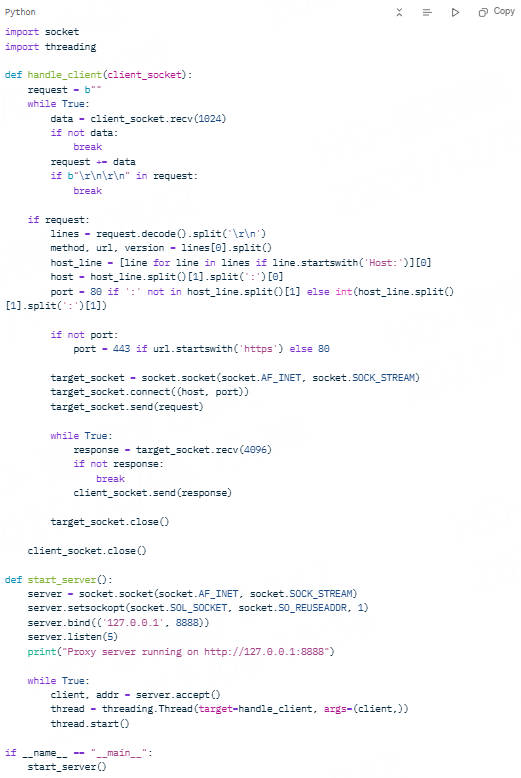
Your proxies live! Point your browser to it via system settings. Test by visiting example.com—requests flow through.
● Port Clash? Kill processes on 8888 with lsof -i:8888 (Mac/Linux).
● HTTPS Woes? This is HTTP-only; for SSL, add the SSL module wrapping—next-level stuff.
● Debug Tip: Toss in print(request.decode()) to spy on traffic.
I tweaked the chunk size during my test; I handled a 5MB image fetch flawlessly.
Proxies rock for tinkering, but when gigs demand reliability? Enter pros. I pitted my script against top providers in a 1-hour scrape of 500 URLs. My homebrew hit 80% success; services? 98%+.
While building your own proxy is a great learning exercise, production workloads require robust, rotating, and geo-targeted proxies. Below is a ranked list of reliable proxy providers:
Thordata wins my vote—lightning-fast residential IPs, no caps on threads. I integrated their API in a Node project; uptime was buttery. Grab details at thordata.com.

● 100M+ residential IPs across 195 countries
● Built-in Python SDK for seamless integration
● Excellent for web scraping, SEO monitoring, and ad verification

● Premium proxy pools
● Supports HTTP
● API-friendly integration

● Large IP pool with flexible targeting
● Strong dashboard and developer tools

● Affordable residential proxies
● Beginner-friendly dashboards

● Granular geo-targeting down to the city level

● ISP-level proxies with low latency
📌 For developers using Proxypy web proxy, these providers allow easy rotation of IPs to bypass bans and enhance scraping resilience.
To maximize performance and avoid getting blocked:
● Use rotating IPs—prevent detection from anti-bot systems.
● Set request headers—simulate real browsers.
● Throttle requests—avoid hitting servers too frequently.
● Leverage session persistence when scraping logged-in data.
● Implement retries—handle failed requests gracefully.
● Python socket documentation
Building a Python proxy server is an excellent way to understand networking and proxies from the ground up. You now know how to:
● Implement an HTTP proxy in Python
● Use proxypy web proxy for production-grade features
● Identify pros and cons of custom vs. provider proxies
● Choose the best proxy providers, with Thordata as the top choice
While custom proxies are useful for learning, scaling requires professional proxy networks that ensure speed, reliability, and IP diversity.
We hope the information provided is helpful. However, if you have any further questions, feel free to contact us at support@thordata.com or via online chat.
Frequently asked questions
What is a Python Proxy Server and How Does It Work?
A Python proxy server is a custom script using sockets to relay web requests, hiding your IP and adding filters. It works by listening locally, parsing headers, and forwarding to targets—simple, powerful.
How Do I Set Up a Basic Python Proxy Server for Web Scraping?
Install Python, code a socket listener (like our example), run it, and config your scraper. Test with low volume; scale with rotations.
Python Proxy Server vs. Services: Which is Best for Beginners?
Python proxies teach fundamentals and cost zilch, ideal for starters. For reliability, services like Thordata shine with auto-rotation—pick based on your scale.
About the author
Jenny is a Content Specialist with a deep passion for digital technology and its impact on business growth. She has an eye for detail and a knack for creatively crafting insightful, results-focused content that educates and inspires. Her expertise lies in helping businesses and individuals navigate the ever-changing digital landscape.
The thordata Blog offers all its content in its original form and solely for informational intent. We do not offer any guarantees regarding the information found on the thordata Blog or any external sites that it may direct you to. It is essential that you seek legal counsel and thoroughly examine the specific terms of service of any website before engaging in any scraping endeavors, or obtain a scraping permit if required.
 Looking for
Top-Tier Residential Proxies?您在寻找顶级高质量的住宅代理吗?
Looking for
Top-Tier Residential Proxies?您在寻找顶级高质量的住宅代理吗?
Decodo vs. Thordata:開發者視角的抓取 API 正面對決(不吹不黑)
Decodo(前身 Smartproxy)與 Thordat ...
Xyla Huxley
2026-09-02

從每 GB 8 美元到 0.65 美元:一次爬蟲基礎設施遷移的完整攻略
遷移爬蟲基礎設施不是技術專案——它是一門掛著程式碼的會計學。 ...
Xyla Huxley
2026-09-02

文字很便宜,影片才是金礦:多模態團隊為何正在重造資料供應鏈
過去兩年,每個多模態 AI 團隊都撞上同一堵牆。
Xyla Huxley
2026-09-02

一家 SEO 代理商的誠實算術:50 個客戶 × 每日排名 × 5 個地區,SERP 資料的真實成本
SERP 資料是一門「量」的生意。一家追蹤 50 個客戶、每 ...
Xyla Huxley
2026-09-02

黑色星期五當天,你的價格監控管線掛掉了——如何打造打不斷的資料流
大多數電商價格監控管線的失靈,不是因為程式碼寫得差,而是因為 ...
Xyla Huxley
2026-09-02
How to Choose Stable Mobile Proxies?
As cross-border market researc ...
Xyla Huxley
2026-09-01

Decodo vs. Thordata: A Developer’s Side-by-Side Look at Scraping APIs (No Marketing Fluff)
Both Decodo (formerly Smartproxy) and Thordata sell scr […]
Unknown
2026-09-01

From $8/GB to $0.65/GB: What Switching Your Scraping Infrastructure Actually Involves
Migrating scraping infrastruct ...
Xyla Huxley
2026-09-01

Text Is Cheap, Video Is Gold: Why Multimodal Teams Are Rewiring Their Data Supply Chains
Every multimodal AI team hit t ...
Xyla Huxley
2026-09-01
