


Web Scraper API
Fetch real-time data from 100+ websites,No development or maintenance required.
SCRAPING SOLUTIONS
Get accurate and in real-time results sourced from Google, Bing, and more.
With 120+ prebuilt and custom scrapers ready for any use case.
No blocks, no CAPTCHAs—unlock websites seamlessly at scale.
Execute scripts in stealth browsers with full rendering and automation
PROXY INFRASTRUCTURE
Over 100 million real residential IPs from genuine users across 190+ countries.
Reliable mobile data extraction, powered by real 4G/5G mobile IPs.
For time-sensitive tasks, utilize residential IPs with unlimited bandwidth.
Fast and cost-efficient IPs optimized for large-scale scraping.
SCRAPING SOLUTIONS
PROXY INFRASTRUCTURE
DATA FEEDS
Full details on all features, parameters, and integrations, with code samples in every major language.
LEARNING HUB
ALL LOCATIONS Proxy Locations
TOOLS
RESELLER
Get up to 50%
Contact sales:partner@thordata.com
Products $/GB
Fetch real-time data from 100+ websites,No development or maintenance required.
Get real-time results from search engines. Only pay for successful responses.
Execute scripts in stealth browsers with full rendering and automation.
Bid farewell to CAPTCHAs and anti-scraping, scrape public sites effortlessly.
Dataset Marketplace Pre-collected data from 100+ domains.
Over 100 million real residential IPs from genuine users across 190+ countries.
Reliable mobile data extraction, powered by real 4G/5G mobile IPs.
For time-sensitive tasks, utilize residential IPs with unlimited bandwidth.
Fast and cost-efficient IPs optimized for large-scale scraping.

Data for AI $/GB
Pricing $0/GB
Docs $/GB
Full details on all features, parameters, and integrations, with code samples in every major language.
Resource $/GB
EN $/GB
产品 $/GB
AI数据 $/GB
定价 $0/GB
产品文档 $/GB
资源 $/GB
简体中文 $/GB

Authorization headers are fundamental to securing API interactions and managing HTTP requests efficiently. When you’re building API integrations, proper authorization header configuration is essential for successful authentication. In this guide, we’ll explore the implementation of cURL authorization headers across various scenarios and platforms.
In modern API ecosystems (OpenAI, Stripe, GitHub, Google Cloud, AWS), almost every non-public endpoint requires a correctly formatted Authorization header. A malformed or missing cURL authentication header is the #1 cause of 401 Unauthorized errors for developers and automation engineers.
Using the -H “Authorization: …” method instead of the shortcut -u gives you full control and avoids accidental credential exposure in process lists (ps aux) and shell history.
Never use curl -u user: pass in production scripts—credentials appear in ps output.
Correct way (2025 best practice):
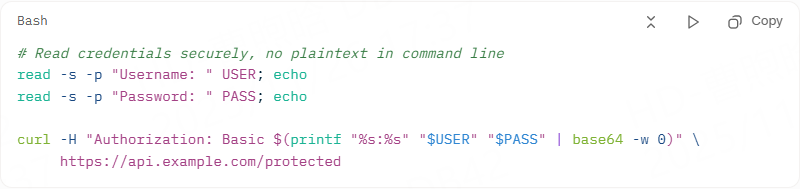

Store token in environment variable or secret manager:

Some services use custom header names (still technically an auth header):


|
Risky |
Safe |
|
curl -u alice:secret123 https://… |
Use environment variables + base64 at runtime |
|
echo “token=abc123” >> script.sh |
Use Hashicorp Vault, AWS Secrets Manager, or .env + gitignore |
|
curl -H “Authorization: Bearer abc123” |
TOKEN=$(op read “op://Private/API/token”) && curl -H “Authorization: Bearer $TOKEN” … |
For web apps mimicking browser behavior, cookies maintain state across requests. cURL’s -b and -c flags handle this elegantly.
Start a session:
curl -c session.jar -d “login=user&pass=secret” https://site.com/auth\.
Follow up:
curl -b session.jar https://site.com/dashboard\.
This curl with an authorization header variant suits e-commerce scrapers or form submissions.
Tailor curl authentication header setups to your platform for optimal security and usability.
Leverage .bashrc:
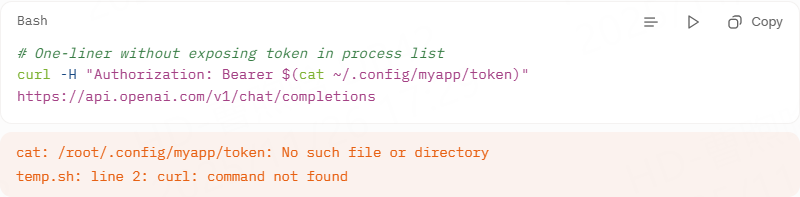

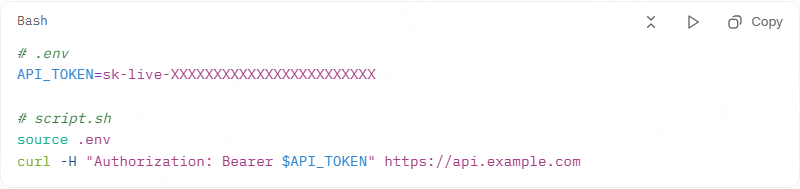
Run with the verbose flag to see exactly what is sent:

You should see in the output:

Common 401 causes in 2025:
● Token expired → refresh it
● Missing Bearer prefix (people write only the token)
● Trailing/leading spaces in token
● Using HTTP instead of HTTPS (some APIs reject it)

Mastering the authorization header curl empowers seamless, secure API engagements, from quick tests to production pipelines. By following this guide, you’ll sidestep common pitfalls, leverage platform strengths, and adapt to evolving standards. Implement these steps today to future-proof your workflows—your code will thank you with reliable 200s.
We hope the information provided is helpful. However, if you have any further questions, feel free to contact us at support@thordata.com or via online chat.

Frequently asked questions
What Is Insomniac Browser and How Does It Compare to MultiLogin?
Insomniac Browser is a user-friendly antidetect tool for spoofing fingerprints in multi-accounting, edging out MultiLogin in ease but lagging in automation. Ideal for beginners vs. MultiLogin’s team-scale power.
Which Antidetect Browser—Insomniac Browser or MultiLogin—Is Best for E-Commerce in 2025?
MultiLogin wins for e-commerce with API-driven scaling and proxy integrations, but Insomniac Browser suits small shops with its quick tab tools. Test both for your volume.
Can Insomniac Browser Replace MultiLogin for Web Scraping?
Not fully—Insomniac Browser lacks MultiLogin’s Selenium hooks, making it weaker for scraping. Use Insomniac for light tasks; switch to MultiLogin for heavy lifts.
About the author
Jenny is a Content Specialist with a deep passion for digital technology and its impact on business growth. She has an eye for detail and a knack for creatively crafting insightful, results-focused content that educates and inspires. Her expertise lies in helping businesses and individuals navigate the ever-changing digital landscape.
The thordata Blog offers all its content in its original form and solely for informational intent. We do not offer any guarantees regarding the information found on the thordata Blog or any external sites that it may direct you to. It is essential that you seek legal counsel and thoroughly examine the specific terms of service of any website before engaging in any scraping endeavors, or obtain a scraping permit if required.
 Looking for
Top-Tier Residential Proxies?您在寻找顶级高质量的住宅代理吗?
Looking for
Top-Tier Residential Proxies?您在寻找顶级高质量的住宅代理吗?
From Scraping Search Results to Buying Ranking Snapshots: How SERP API Turns SEO Monitoring from an Engineering Problem into a Procurement Problem
In the daily operations of Sea ...
Xyla Huxley
2026-10-24
2026跨境電商精准控價:如何利用智能 Web Scraper API 攻克動態網頁與反爬蟲壁壘?
在跨境電商進入白熱化競爭的 2026年,即時掌握競品定價、庫 ...
Xyla Huxley
2026-10-24
MCN 週報的第 4 頁:頻道情報怎麼從「截圖」變成「資料」
每家 MCN 都有一份週報——簽約進度、頻道表現、內部排行。 ...
Xyla Huxley
2026-10-24
Give Your Agent a Search Tool and Watch It Stop Guessing: A Field Guide to MCP-Connected Agents
Agents fail in production for ...
Xyla Huxley
2026-10-24
Seven Terms Every Legal-AI Data Buyer Has to Stop Nodding Through
Legal-tech teams building rese ...
Xyla Huxley
2026-10-24
A Risk Register for Fraud Teams Who Just Discovered Web Data
Fraud teams adopted web data t ...
Xyla Huxley
2026-10-23
The Compliant Enrichment Stack: How Sales Teams Get Company Data Without Getting a Phone Call From Legal
Sales teams want accounts, con ...
Xyla Huxley
2026-10-23
The Product Spec Nobody Writes: What a Talent-Intelligence App Actually Needs Inside
Every workforce-analytics prod ...
Xyla Huxley
2026-10-23
資料不是抓到就能用:AI 團隊採購 Dataset 前真正該問的問題
AI 團隊真正缺的通常不是資料數量,而是資料能否穩定進入模型 ...
Xyla Huxley
2026-10-19
