


Web Scraper API
Fetch real-time data from 100+ websites,No development or maintenance required.
SCRAPING SOLUTIONS
Get accurate and in real-time results sourced from Google, Bing, and more.
With 120+ prebuilt and custom scrapers ready for any use case.
No blocks, no CAPTCHAs—unlock websites seamlessly at scale.
Execute scripts in stealth browsers with full rendering and automation
PROXY INFRASTRUCTURE
Over 100 million real residential IPs from genuine users across 190+ countries.
Reliable mobile data extraction, powered by real 4G/5G mobile IPs.
For time-sensitive tasks, utilize residential IPs with unlimited bandwidth.
Fast and cost-efficient IPs optimized for large-scale scraping.
SCRAPING SOLUTIONS
PROXY INFRASTRUCTURE
DATA FEEDS
Full details on all features, parameters, and integrations, with code samples in every major language.
LEARNING HUB
ALL LOCATIONS Proxy Locations
TOOLS
RESELLER
Get up to 50%
Contact sales:partner@thordata.com
Products $/GB
Fetch real-time data from 100+ websites,No development or maintenance required.
Get real-time results from search engines. Only pay for successful responses.
Execute scripts in stealth browsers with full rendering and automation.
Bid farewell to CAPTCHAs and anti-scraping, scrape public sites effortlessly.
Dataset Marketplace Pre-collected data from 100+ domains.
Over 100 million real residential IPs from genuine users across 190+ countries.
Reliable mobile data extraction, powered by real 4G/5G mobile IPs.
For time-sensitive tasks, utilize residential IPs with unlimited bandwidth.
Fast and cost-efficient IPs optimized for large-scale scraping.

Data for AI $/GB
Pricing $0/GB
Docs $/GB
Full details on all features, parameters, and integrations, with code samples in every major language.
Resource $/GB
EN $/GB
产品 $/GB
AI数据 $/GB
定价 $0/GB
产品文档 $/GB
资源 $/GB
简体中文 $/GB

As online platforms become more sophisticated at detecting browser fingerprints, managing multiple accounts has shifted from a convenience to a necessity. Today’s websites correlate device, browser, and system signals, not just cookies, to identify linked users.
Professionals, therefore, need isolated browser environments that appear as genuinely separate devices at the fingerprint level. Incogniton was created to address this exact challenge.
Incogniton is a Netherlands-based anti-detect browser with a long-standing presence in the market. Over time, the browser has earned trust by focusing on stability, reliability, and practical workflows rather than experimental features.
This approach has led to adoption by more than 1 million users worldwide, including individuals and companies that manage multiple accounts at scale and cannot afford errors, bans, or data exposure.
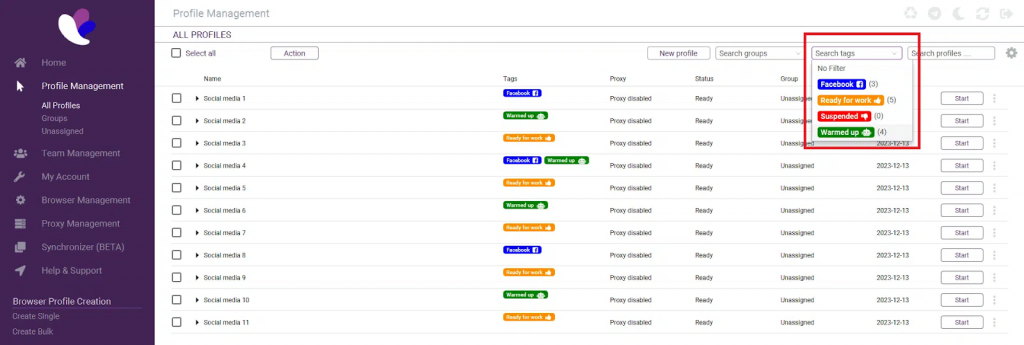
At the core of Incogniton is a browser profile architecture that treats each browser instance as a distinct device. Profiles are generated with consistent, realistic fingerprints derived from low-level signals such as rendering outputs and system characteristics, ensuring each identity remains stable over time and isolated from others.
In practical terms, this means every profile operates with:
● Its own fingerprint configuration
● Separate cookies, cache, and local storage
● Individual proxy and network settings
● Configurable browser versions and system parameters
Because these profiles never overlap, websites see each session as a completely unrelated user. This structure allows professionals to run parallel workflows without the risk of accidental cross-linking.
Many anti-detect tools focus primarily on individual users. Incogniton is designed to support collaborative workflows through role-based team accounts, where access is explicitly controlled.

Team members only see the browser profiles assigned to them, while all profile data, including cookies, fingerprints, and settings, is synchronized through encrypted cloud storage. This allows teams to switch devices or work locations without breaking profile continuity or integrity.
In addition to access control and cloud synchronization, Incogniton includes workflow-oriented tools such as Bulk Profile Creation and the Synchronizer. These tools help teams set up large environments faster and reduce repetitive manual actions.
This design makes Incogniton well-suited for agencies, distributed teams, and organizations that manage shared browser infrastructure at scale.
Incogniton is designed around the assumption that users may be handling sensitive information. The platform operates in alignment with GDPR standards based on its European data handling practices. Privacy and data protection are treated as core requirements within the platform.
By isolating browser data at the profile level and avoiding unnecessary data sharing, Incogniton helps minimize exposure risks. This makes it a viable option for tasks that demand a higher level of caution, such as:
● Managing cryptocurrency wallets and exchanges
● Performing financial or payment-related operations
● Operating high-value or high-risk online accounts
For users who cannot compromise on security, this privacy-first approach is a decisive advantage.
With the Incogniton browser, every profile can be paired with its own proxy, so each session operates under an independent network identity.
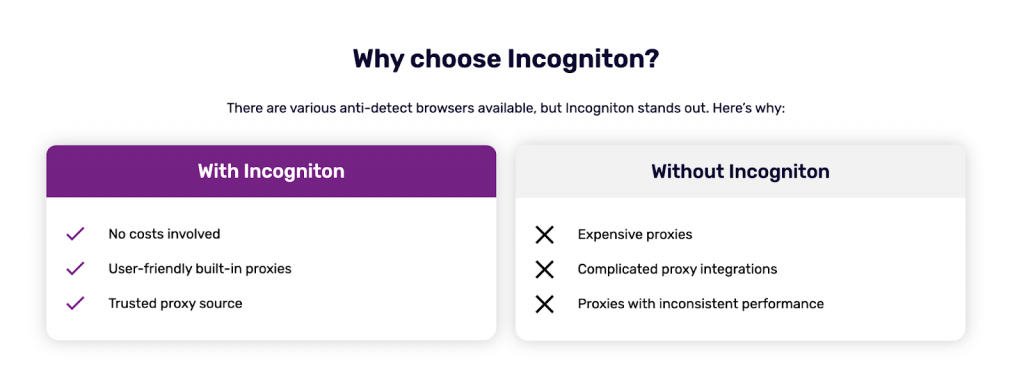
Users may plug in third-party proxies, select an option from the Incogniton Proxy Shop, or make use of the free built‑in unblocked proxies for lightweight tasks such as quick tests or scraping.
This per‑profile network assignment ensures that the IP linked to a browser profile remains consistent with its fingerprint, which helps maintain separation between accounts.
With Incogniton, users can:
● Set a proxy for each profile individually
● Switch or update proxies without rebuilding profiles
● Select from residential, mobile, or datacenter IP options depending on task requirements
● Use in‑built proxies for trial runs or low‑risk operations
This structure supports clean identity segmentation for multi‑account setups and reduces the chance of accounts being linked through IP overlaps.
Incogniton also supports automation workflows through its Python and TypeScript SDKs. Developers can work directly with browser profiles using a documented API that simplifies tasks such as launching sessions, managing cookies, or integrating automation pipelines.
The SDKs connect smoothly with automation frameworks like Playwright, Puppeteer, and Selenium. This allows scripts, bots, or QA tooling to operate inside isolated profiles while maintaining fingerprint consistency.
These capabilities make Incogniton suitable for automation-heavy environments, development teams, and users who want to integrate browser control into their software stacks.
This guide walks you through connecting Thordata proxies to Incogniton so each browser profile runs with a clean, dedicated network identity.
● Go to the Incogniton website and download the application for macOS or Windows.
● Install the app and create an account if you are a new user.
● Open Incogniton and sign in.
● Visit the Thordata homepage and sign in or register.
● Choose a proxy plan, such as Residential, ISP, or Datacenter.
● Copy your proxy access details, including Host/IP, Port, Username, and Password.
● In Incogniton, open Profile Management and create a new profile or edit an existing one.
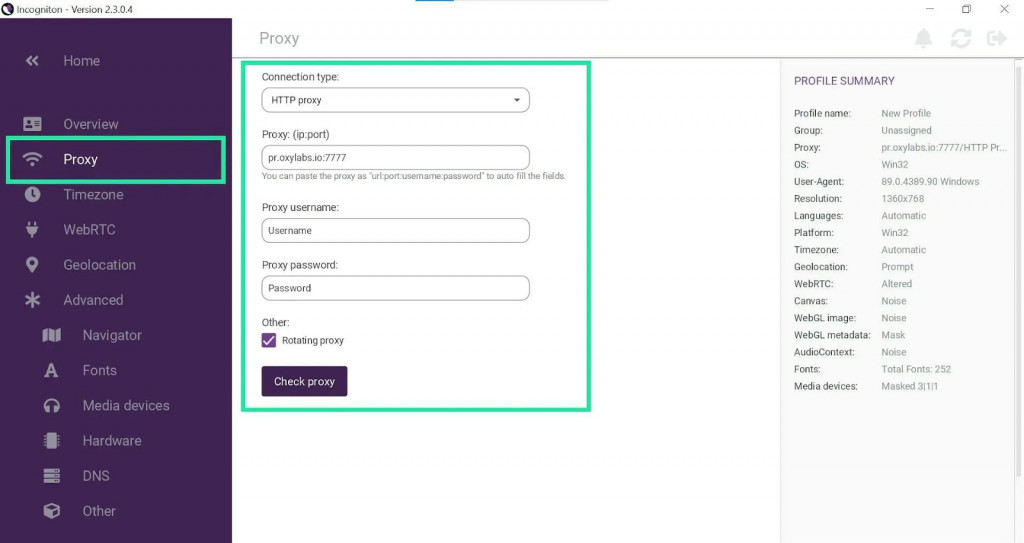
● Navigate to the Proxy tab in the left panel.
● Select the protocol you intend to use, such as HTTP, HTTPS.
● Enter the proxy address in the format IP:Port.
● Provide your Thordata authentication credentials if required.
● Click Check Proxy to verify the connection, then save or create your profile.
● Start the profile you just configured.
● Visit an IP or geolocation-checking page to confirm the proxy is active.
This setup ensures each Incogniton profile runs with a Thordata-assigned IP, maintaining network separation alongside Incogniton’s isolated fingerprinting system for stable multi-account workflows.
Incogniton has established itself as a dependable anti-detect browser for users who require precision, control, and trust. With its strong profile isolation model, team-oriented design, serious approach to privacy, and robust proxy handling, it stands out as one of the most well-rounded solutions available today.
For professionals working with multiple accounts, especially in environments where mistakes are costly, Incogniton offers a structured, secure, and proven way to operate with confidence.
Contact us at support@thordata.com for tailored advice.

Frequently asked questions
What is Incogniton?
Incogniton is an anti-detect browser designed for managing multiple online accounts securely, using features like fingerprint spoofing to maintain anonymity and avoid detection.
How does it help with multi-accounting?
It allows users to create and manage unique browser profiles, each with customizable digital fingerprints, proxies, and automation tools, making it ideal for tasks like social media marketing or e-commerce.
Is it suitable for beginners?
Yes, its user-friendly interface and automation features make it accessible, though some technical knowledge of proxies helps maximize its potential.
About the author
Jenny is a Content Specialist with a deep passion for digital technology and its impact on business growth. She has an eye for detail and a knack for creatively crafting insightful, results-focused content that educates and inspires. Her expertise lies in helping businesses and individuals navigate the ever-changing digital landscape.
The thordata Blog offers all its content in its original form and solely for informational intent. We do not offer any guarantees regarding the information found on the thordata Blog or any external sites that it may direct you to. It is essential that you seek legal counsel and thoroughly examine the specific terms of service of any website before engaging in any scraping endeavors, or obtain a scraping permit if required.
 Looking for
Top-Tier Residential Proxies?您在寻找顶级高质量的住宅代理吗?
Looking for
Top-Tier Residential Proxies?您在寻找顶级高质量的住宅代理吗?
Buy Residential Proxies: What to Check Before You Order
Compare residential proxy loca ...
Greta
2026-09-17
逐工作負載的 Bright Data 遷移指南(你不需要全部搬走)
整家供應商的遷移會失敗;逐工作負載的路由會贏。Bright ...
Xyla Huxley
2026-09-17
買影片資料集之前:14 個幫你省下一季白費工程的問題
多數影片資料集的採購會失望,原因都一樣三樣:標題數字的意思跟 ...
Xyla Huxley
2026-09-17
語音資料的五個迷思:以及聲音團隊實際需要的東西
語音與聲音模型在生產環境失敗的原因,多半可以追溯到五個關於訓 ...
Xyla Huxley
2026-09-17
你的 SEO 儀表板說一切正常,你的 AI 搜尋能見度說:才不是
品牌能見度已經分裂成兩層:經典的十條藍色連結 SERP,以及 ...
Xyla Huxley
2026-09-17
你的連鎖餐廳 Google 商家資料,正在悄悄壞掉:多店據點監控現場指南
擁有 200 家分店的品牌,問題不是「一個 Google 商 ...
Xyla Huxley
2026-09-17
How to Test a Residential Proxy: Speed, Location, and Reliability Checklist
Test residential proxy speed, ...
greta
2026-09-16
Evaluating a Scraping API on Engineering Criteria, Not Marketing Claims: Oxylabs and Thordata, Rubric-Style
Vendor evaluations drift to wh ...
Xyla Huxley
2026-09-16

Does Your Product Work in São Paulo? A Geo-Testing Lab Notebook, With Providers Compared
Teams ship localized products ...
Xyla Huxley
2026-09-16
