


Residential Proxies
Over 60 million real residential IPs from genuine users across 190+ countries.
Your First Plan is on Us!
Get 100% of your first residential proxy purchase back as wallet balance, up to $900.
PROXY SOLUTIONS
Over 60 million real residential IPs from genuine users across 190+ countries.
Reliable mobile data extraction, powered by real 4G/5G mobile IPs.
Guaranteed bandwidth — for reliable, large-scale data transfer.
For time-sensitive tasks, utilize residential IPs with unlimited bandwidth.
Fast and cost-efficient IPs optimized for large-scale scraping.
A powerful web data infrastructure built to power AI models, applications, and agents.
High-speed, low-latency proxies for uninterrupted video data scraping.
Extract video and metadata at scale, seamlessly integrate with cloud platforms and OSS.
6B original videos from 700M unique channels - built for LLM and multimodal model training.
Get accurate and in real-time results sourced from Google, Bing, and more.
Execute scripts in stealth browsers with full rendering and automation
No blocks, no CAPTCHAs—unlock websites seamlessly at scale.
Get instant access to ready-to-use datasets from popular domains.
PROXY PRICING
Full details on all features, parameters, and integrations, with code samples in every major language.
LEARNING HUB
ALL LOCATIONS Proxy Locations
TOOLS
RESELLER
Get up to 50%
Contact sales:partner@thordata.com
Proxies $/GB
Over 60 million real residential IPs from genuine users across 190+ countries.
Reliable mobile data extraction, powered by real 4G/5G mobile IPs.
For time-sensitive tasks, utilize residential IPs with unlimited bandwidth.
Fast and cost-efficient IPs optimized for large-scale scraping.
Guaranteed bandwidth — for reliable, large-scale data transfer.
Scrapers $/GB
Fetch real-time data from 100+ websites,No development or maintenance required.
Get real-time results from search engines. Only pay for successful responses.
Execute scripts in stealth browsers with full rendering and automation.
Bid farewell to CAPTCHAs and anti-scraping, scrape public sites effortlessly.
Dataset Marketplace Pre-collected data from 100+ domains.

Data for AI $/GB
A powerful web data infrastructure built to power AI models, applications, and agents.
High-speed, low-latency proxies for uninterrupted video data scraping.
Extract video and metadata at scale, seamlessly integrate with cloud platforms and OSS.
6B original videos from 700M unique channels - built for LLM and multimodal model training.
Pricing $0/GB
Starts from
Starts from
Starts from
Starts from
Starts from
Starts from
Starts from
Starts from
Docs $/GB
Full details on all features, parameters, and integrations, with code samples in every major language.
Resource $/GB
EN
首单免费!
首次购买住宅代理可获得100%返现至钱包余额,最高$900。
代理 $/GB
数据采集 $/GB
AI数据 $/GB
定价 $0/GB
产品文档
资源 $/GB
简体中文$/GB
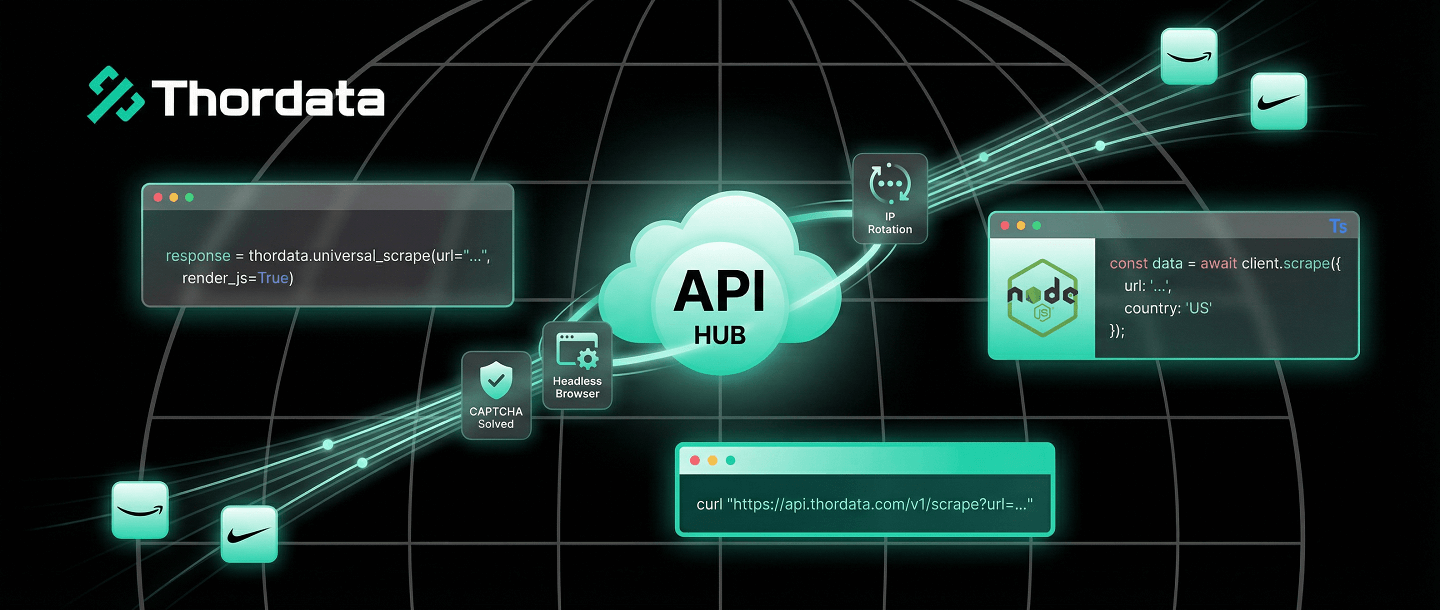

There are two ways to scrape the web. The hard way involves managing thousands of proxies, rotating User-Agents, solving CAPTCHAs, and patching your Puppeteer script every time Chrome updates.
The smart way is to offload that entire stack to a Web Scraper API. You send a URL; you get back clean HTML or JSON. No blocks. No headaches.
In this guide, I will show you how to integrate Thordata’s API into your workflow using standard cURL requests, and more importantly, using our robust Python and Node.js SDKs.
A standard proxy just changes your IP address. A Scraper API acts as a complete browser in the cloud.
api.thordata.com with your target URL.The fastest way to test an API is via the terminal. This verifies your API token and the connectivity.
curl "https://api.thordata.com/v1/scraper?token=YOUR_API_TOKEN&url=https://www.amazon.com&render_js=true"Using raw `requests` is fine, but the official SDK handles error parsing, type hints, and retries for you. This is the preferred method for enterprise Python projects.
pip install thordata-sdkfrom thordata import ThordataClient
# Initialize with your token
client = ThordataClient(scraper_token="YOUR_TOKEN")
print("🚀 Scraping dynamic content...")
# universal_scrape handles JS rendering automatically
html = client.universal_scrape(
url="https://www.nike.com/launch",
js_render=True,
wait_for=".product-card", # Wait for specific element
country="us"
)
print(f"Success! Retrieved {len(html)} bytes.")
# You can now parse 'html' with BeautifulSoupFor JavaScript/TypeScript developers, our NPM package provides full type support.
npm install thordata-sdkimport { ThordataClient } from "thordata-sdk";
const client = new ThordataClient({
scraperToken: "YOUR_TOKEN"
});
async function run() {
const html = await client.universalScrape({
url: "https://www.walmart.com",
jsRender: true,
outputFormat: "html"
});
console.log("Data fetched:", html.substring(0, 200));
}
run();Why pay for an API when you can write a scraper for free? Because “free” scrapers are expensive to maintain.
| Component | DIY (Do It Yourself) | Thordata API |
|---|---|---|
| IP Rotation | Buy proxy pools ($500+/mo), manage rotation logic. | Included automatically. |
| Headless Browser | Manage Puppeteer clusters, high RAM costs. | Included (Cloud Rendering). |
| Anti-Bot Evasion | Constantly patching fingerprinting leaks. | Handled by Thordata engineers. |
| Success Rate | Variable (breaks often). | 99.9% guaranteed. |
The Web Scraper API allows you to focus on what matters: the data. By abstracting away the complexity of proxies and headless browsers, you turn web scraping into a simple function call. Start with the SDKs today to build resilient pipelines in minutes, not days.

Frequently asked questions
Why use a Web Scraper API instead of local proxies?
Local proxies only rotate IPs. An API handles IP rotation, header management (User-Agents), CAPTCHA solving, and JavaScript rendering (Headless Browser) in a single request, saving you hundreds of engineering hours.
How does the Python SDK simplify scraping?
The Thordata Python SDK abstracts away HTTP request complexity. The ‘universal_scrape’ method automatically handles JS rendering parameters and retries, returning clean HTML or JSON with a single function call.
What is the cost difference?
Building a robust scraper requires developer salaries, server costs, and proxy subscriptions. An API model charges only for successful requests, often reducing Total Cost of Ownership (TCO) by 60-70% for small to medium teams.
About the author
Kael is a Senior Technical Copywriter at Thordata. He works closely with data engineers to document best practices for bypassing anti-bot protections. He specializes in explaining complex infrastructure concepts like residential proxies and TLS fingerprinting to developer audiences. All code examples in this article have been tested in real-world scraping scenarios.
The thordata Blog offers all its content in its original form and solely for informational intent. We do not offer any guarantees regarding the information found on the thordata Blog or any external sites that it may direct you to. It is essential that you seek legal counsel and thoroughly examine the specific terms of service of any website before engaging in any scraping endeavors, or obtain a scraping permit if required.
 Looking for
Top-Tier Residential Proxies?您在寻找顶级高质量的住宅代理吗?
Looking for
Top-Tier Residential Proxies?您在寻找顶级高质量的住宅代理吗?
Run Python in Terminal: Args, Venv & Nohup Guide
Kael Odin Last updated on 2026-01-10 12 min read 📌 Key […]
Unknown
2026-01-13
ChatGPT Web Scraping: AI Code & Parsing Guide
Kael Odin Last updated on 2026-01-13 6 min read 📌 Key T […]
Unknown
2026-01-13
AutoScraper Python: Smart Scraping & Proxy Guide
Kael Odin Last updated on 2026-01-12 11 min read 📌 Key […]
Unknown
2026-01-13
