


Web Scraper API
Fetch real-time data from 100+ websites,No development or maintenance required.
SCRAPING SOLUTIONS
Get accurate and in real-time results sourced from Google, Bing, and more.
With 120+ prebuilt and custom scrapers ready for any use case.
No blocks, no CAPTCHAs—unlock websites seamlessly at scale.
Execute scripts in stealth browsers with full rendering and automation
PROXY INFRASTRUCTURE
Over 100 million real residential IPs from genuine users across 190+ countries.
Reliable mobile data extraction, powered by real 4G/5G mobile IPs.
For time-sensitive tasks, utilize residential IPs with unlimited bandwidth.
Fast and cost-efficient IPs optimized for large-scale scraping.
SCRAPING SOLUTIONS
PROXY INFRASTRUCTURE
DATA FEEDS
Full details on all features, parameters, and integrations, with code samples in every major language.
LEARNING HUB
ALL LOCATIONS Proxy Locations
TOOLS
RESELLER
Get up to 50%
Contact sales:partner@thordata.com
Products $/GB
Fetch real-time data from 100+ websites,No development or maintenance required.
Get real-time results from search engines. Only pay for successful responses.
Execute scripts in stealth browsers with full rendering and automation.
Bid farewell to CAPTCHAs and anti-scraping, scrape public sites effortlessly.
Dataset Marketplace Pre-collected data from 100+ domains.
Over 100 million real residential IPs from genuine users across 190+ countries.
Reliable mobile data extraction, powered by real 4G/5G mobile IPs.
For time-sensitive tasks, utilize residential IPs with unlimited bandwidth.
Fast and cost-efficient IPs optimized for large-scale scraping.

Data for AI $/GB
Pricing $0/GB
Docs $/GB
Full details on all features, parameters, and integrations, with code samples in every major language.
Resource $/GB
EN $/GB
产品 $/GB
AI数据 $/GB
定价 $0/GB
产品文档 $/GB
资源 $/GB
简体中文 $/GB
Start with one SERP request, then wire Thordata into LangChain: run your first search, tune engine and region, compress a full JSON payload into something a model can digest, and hand it to create_agent so it decides what to search.
By the end you will have an agent that looks things up on its own: it picks its own search terms and engine, reads real results, and answers with links. Every line of code here was run for real, and the screenshots are actual terminal windows from those runs — not mockups.
This tutorial covers SERP only: Thordata’s search capability and the LangChain wrapper around it. The Web Scraper engines, which fetch an arbitrary page, are deliberately out of scope for this integration, and we will show where that boundary sits.
What you will do:
langchain-thordata and configure the API tokenThorDataClient and read the response shapeThorDataSearchToolcreate_agent, and handle its failuresContents
A large language model’s knowledge stops the moment training or fine-tuning finished. Ask about something from last week and it either admits ignorance or, worse, assembles a plausible answer out of older facts. Not because it is not smart enough, but because that event never entered its weights.
Zero-shot inference solves half of it: put fresh material in the context and the model reads and summarises it immediately. But it forgets the moment the turn ends, so you would have to fetch and paste that material again on every question. The real problem is not comprehension — it is where fresh material comes from, and when.
The obvious workaround is to search first and paste the results into the prompt. That works, right up until it turns into a pile of conditionals: when to search, what to search for, how many results, what to do when they are too long. You end up making every decision on the model’s behalf. LangChain exists to move that layer.
A LangChain tool is just “a function the model may call by itself”. There is nothing mystical about it — three things define it:
Once the tool is registered, the loop is out of your hands: the model decides whether to search, what to search for, and whether the results are good enough to answer with. An agent is a model plus tools plus that loop.
On the Thordata side there are two pieces:
ThorDataClient — a plain HTTP client, for when you want to drive the flow yourself;ThorDataSearchTool — the same client wrapped as a LangChain tool for an agent.Both share one set of parameters and one authentication path, so learning either teaches you both. This tutorial starts with the client, then the tool, then hands it to an agent.
Three things: a Python environment, a Thordata API token, and — for the last section — a model token.
Python 3.10 or newer. The package’s runtime dependencies are just langchain-core, httpx and pydantic, so you do not need all of LangChain just to write client scripts:
pip install langchain-thordataThe agent sections need the full framework and a model adapter:
pip install langchain langchain-openaiGrab an API token from the Thordata console and put it in an environment variable; the client reads it automatically:
# Windows PowerShell
$env:THORDATA_API_KEY = "your-api-token"

# macOS / Linux
export THORDATA_API_KEY="your-api-token"| Variable | Purpose | Default |
|---|---|---|
THORDATA_API_KEY | Holds the API token; required | none (raises a configuration error) |
THORDATA_API_TOKEN | Compatibility alias for the same token; both variable names are read | none |
THORDATA_SERP_API_URL | Point at another endpoint, for debugging | https://scraperapi.thordata.com/request |
The token travels as a Bearer header, and it never appears in tool output or in exception messages. That is covered by a dedicated test inside the package, so printing a traceback into your logs will not leak it.
Shortest path first: one client, one query, three results.
"""First Thordata SERP call: one Google search, print the top three results."""

from langchain_thordata import ThorDataClient

with ThorDataClient() as client:
    result = client.search(
        q="langchain agent framework",
        engine="google",
        gl="us",
        hl="en",
        num=3,
    )

for item in result["organic"]:
    print(f'{item["position"]}. {item["title"]}')
    print(f'   {item["link"]}')
    print(f'   {(item.get("description") or "")[:100]}')

print()
print("credits used:", result["credits"])
print("request parameters sent:", result["spider_parameter"])
ThorDataClient is a context manager and closes its connection pool on exit. For a script, with is enough; in a long-running service, call close() or aclose() explicitly.
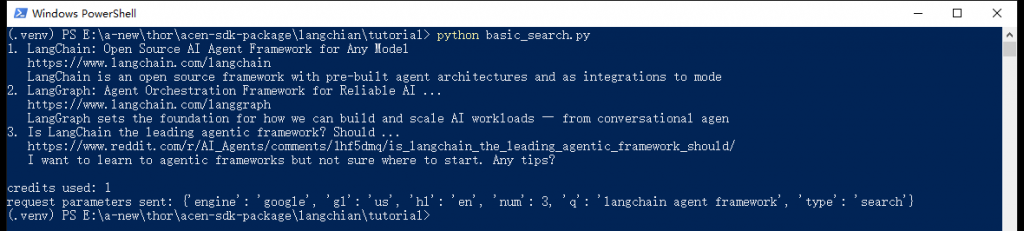
Real terminal output from the first search. The last line is the parameter set Thordata actually executed — the quickest way to confirm your values took effect.
Not HTML — already-parsed JSON. With the middle trimmed out, the shape is:
{
  "code": 200,
  "credits": 1,
  "cache_status": false,
  "organic": [
    {"position": 1, "title": "...", "link": "https://...", "description": "..."}
  ],
  "search_metadata": {"id": "...", "status": "Success", "total_time_taken": 0.699},
  "spider_parameter": {"engine": "google", "gl": "us", "hl": "en", "num": 3, "q": "...", "type": "search"}
}| Field | Meaning |
|---|---|
organic | Organic results; the field name changes per engine (full table in the next section) |
credits | Quota consumed by this request — 1 for an ordinary search |
cache_status | Whether the server served a cached response. Repeated identical queries never hit it in our runs, so do not treat it as a quota-saving trick |
search_metadata | Request ID, status and duration. The id is the most useful thing to give Thordata support |
spider_parameter | The parameters the server actually ran. If you left region or language out, this shows what it filled in |
Why spider_parameter matters. The classic search-API bug report is “I set the region and the results are still wrong”. This field echoes the final parameters, which beats guessing.
The same client, a few different arguments, a different source. This script runs three engines in one go: Google News (US English, last 24 hours), Bing web (UK) and DuckDuckGo web (US).
"""One client, several engines: change the engine, the region and the time window.

Which field carries the results depends on the engine: google uses `organic`,
bing uses `organic_results`, google_news uses `news`, google_local uses `places`.
"""

from langchain_thordata import ThorDataClient

with ThorDataClient() as client:
    # Google News, US English, last 24 hours only
    news = client.search(
        q="AI agent",
        engine="google_news",
        gl="us",
        hl="en",
        num=3,
        tbs="qdr:d",
    )
    print("== google_news / gl=us / hl=en / tbs=qdr:d ==")
    print()
    for item in news["news"][:3]:
        print(f'{item["date"]:>10}  [{item["source"]}]  {item["title"][:44]}')

    # Bing web results, United Kingdom
    print()
    print("== bing / gl=gb / hl=en ==")
    print()
    bing = client.search(q="langchain agent framework", engine="bing", gl="gb", hl="en", num=3)
    for item in bing["organic_results"][:3]:
        print(f'{item["rank"]}. {item["title"][:44]}')
        print(f'   {item.get("redirection_link") or item["link"]}')

    # DuckDuckGo: a third source that does not go through Google or Bing
    print()
    print("== duckduckgo / gl=us / hl=en ==")
    print()
    ddg = client.search(q="thordata serp api", engine="duckduckgo", gl="us", hl="en", num=3)
    for item in ddg["organic_results"][:3]:
        print(f'{item["position"]}. {item["title"][:44]}')
        print(f'   {item["source"]["link"]}')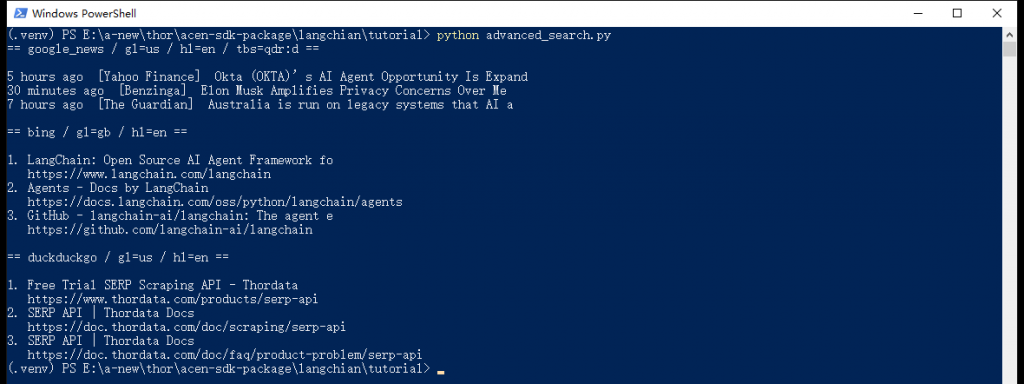
One script, three engines. Note that each keeps its results in a different field, and that the news block carries a date and a source.
This is the first trap: organic is not universal. Here is the mapping we measured —
| Engine | Result field | Notes |
|---|---|---|
google, google_scholar, … | organic | The common case |
google_news | news | Carries date, source, image_url |
google_images / google_videos | images / videos | — |
google_shopping | shopping | Price fields |
google_local, google_maps | places | Local businesses |
google_jobs | jobs_results | — |
google_trends | trends_results | — |
bing, bing_news, duckduckgo, yandex | organic_results | Bing’s link is a redirect; the real target is redirection_link. DuckDuckGo has no top-level link at all — it lives in source.link |
That table is exactly what the agent tool uses later to flatten every engine into one format.
| Parameter | What it does |
|---|---|
q | The query. Yandex wants text instead; the client converts it for you |
engine | Engine name. SUPPORTED_ENGINES holds 38 entries, two of which (google_search, google_places) are compatibility aliases |
gl / hl | Two-letter country and language codes, such as us/en or gb/en. country/language work as friendlier names |
num | How many results to ask for. It is a hint to the upstream engine, not a guarantee — Google News often returns more, so slice explicitly in your script |
page | Pagination, 1-based |
tbs | Google time filter: qdr:d for the past day, qdr:w for the past week |
location | A finer-grained geographic hint |
safe | Safe search: active or off |
| Anything else | Long-tail parameters for specialised engines (departure_id, product_id, author_id, …) go in as a plain dict |
Two deliberate design choices are worth knowing. First, an unsupported engine is rejected outright rather than being silently swapped for Google: changing the source changes your intent, and a silent downgrade is far more dangerous than an error. Second, unrecognised parameters are dropped rather than forwarded upstream — the request is built from an explicit allowlist, which keeps typos from turning into surprises.
No Web Scraper in this integration. Page-fetching engines such as google_webpage and webpage are refused client-side with Web Scraper engines are not available in the V1 SERP integration. If you need page content, use Thordata’s Web Scraper product rather than expecting it here.
Now the LangChain shape. The same search, wrapped as a tool:
"""Call the Thordata LangChain tool like a plain function and inspect its contract."""

import json

from langchain_thordata import ThorDataSearchTool

tool = ThorDataSearchTool()

print("tool name:", tool.name)
print()
print("arguments the model can fill:", list(tool.get_input_schema().model_json_schema()["properties"]))
print()

raw = tool.invoke(
    {
        "query": "thordata serp api",
        "engine": "google",
        "country": "us",
        "language": "en",
        "num": 3,
    }
)

data = json.loads(raw)
print("the tool returns a JSON string; top-level fields:", list(data.keys()))
print()
for item in data["organic"]:
    print(f'{item["position"]}. {item["title"]}')
    print(f'   {item["link"]}')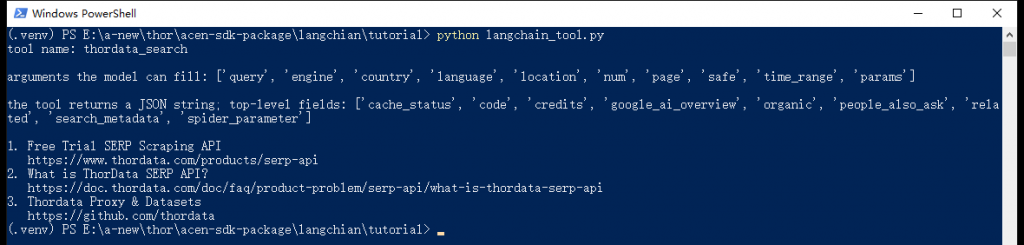
The tool introduces itself: its name, the arguments the model may fill, and the fact that it returns a JSON string.
Three details to note:
json.loads is the caller’s job. Response envelopes that nest the payload as a JSON string are already unwrapped in the client, so you only parse once.query/country/language and the client maps them to the API-native q/gl/hl. ThorDataClient accepts either spelling, but the tool does not: its input schema declares only query/country/language, so q/gl/hl are dropped as unknown fields and you end up sending a request with no query at all. Engine-specific fields go in params.| Argument | Type | Notes |
|---|---|---|
query | string | The search terms |
engine | enum | Defaults to google_search (that is, google) |
country / language | string | Two-letter codes |
location | string | Finer geographic hint |
num | integer 1–100 | Result count |
page | integer ≥ 1 | Pagination |
safe | active/off | Safe search |
time_range | string | Time filter such as qdr:d |
params | object | Long-tail parameters for specialised engines, e.g. {"departure_id": "SFO", "arrival_id": "JFK"} |
There is an async variant too, which drops straight into FastAPI-style code:
data = json.loads(await tool.ainvoke({"query": "thordata", "engine": "google", "num": 2}))The tool exists, so can we just hand ThorDataSearchTool to a model? Yes — that is one line. But in practice it has an obvious problem: the results are enormous.
The tool serialises the whole payload for the model. Alongside titles, links and snippets, a SERP response carries favicons, image URLs, pagination tokens and related searches. Counted with the o200k_base tokenizer, 5 results each, across two sampling runs a day apart:
| Engine · query (gl=us, hl=en, num=5) | Raw JSON | Compacted | Saved |
|---|---|---|---|
google · langchain agent framework | 764–765 tokens | 245 tokens | 68% |
google_news · AI agent | 2609–3012 tokens | 215–221 tokens | 92–93% |
bing · langchain agent framework | 7714–8323 tokens | 299–392 tokens | 95–96% |
The compacted side is stable — a couple of hundred tokens per query — while the raw JSON moves every day, which is what the ranges above capture. So the percentage drifts but the order of magnitude does not: whichever run you look at, this step removes more than two thirds of the input.
Bing is the extreme case because every result carries a long bing.com/ck/a redirect URL. None of those bytes are useful to the model, but you pay for them per token and they eat the context window. Worth doing yourself.
The logic is one sentence: whatever the engine, pull out “title | link | snippet”. The field-name differences are flattened with the table from the previous section:
RESULT_KEYS = (
    "organic",          # google, google_scholar
    "organic_results",  # bing, duckduckgo, yandex
    "news",             # google_news
    "shopping",         # google_shopping
    "images",           # google_images
    "videos",           # google_videos
    "places",           # google_local, google_maps
    "jobs_results",     # google_jobs
    "trends_results",   # google_trends
)

client = ThorDataClient()


def shorten(value: object) -> str:
    """Flatten a field into one line: DuckDuckGo nests the link under `source`."""
    if isinstance(value, dict):
        return str(value.get("link") or value.get("title") or "")
    return str(value or "")


def compact(result: dict, limit: int = 5) -> str:
    """Turn a SERP payload into "title | link | snippet" lines for the model."""
    items = next((result[key] for key in RESULT_KEYS if result.get(key)), [])
    lines = []
    for item in items[:limit]:
        title = shorten(item.get("title") or item.get("name"))
        # Bing reports a bing.com/ck/a redirect as `link`; prefer the real target
        link = shorten(
            item.get("redirection_link")
            or item.get("link")
            or item.get("url")
            or item.get("source")
        )
        note = shorten(item.get("snippet") or item.get("description"))
        line = " | ".join(part for part in (title, link, note) if part)
        # Data-shaped results such as google_trends have no title or link at all
        if not line:
            line = ", ".join(f"{key}={value}" for key, value in item.items() if isinstance(value, (str, int, float)))
        lines.append(line)
    return "\n".join(line for line in lines if line) or "no results"
RESULT_KEYS covers every engine in that table. The one special case is google_trends: it returns a time series, so its items have neither a title nor a link and compact() falls back to joining the scalar fields (date=..., value=52) rather than emitting a blank line.
This time we write a thin wrapper with the @tool decorator rather than using the shipped tool class, because compact() has to sit in the middle:
@tool
def search_web(query: str, engine: str = "google", country: str = "us", language: str = "en") -> str:
    """Search live web or news results and return titles, links and snippets.

    query: the search terms.
    engine: search engine, one of google, google_news, bing, duckduckgo, yandex...
    country/language: two-letter codes such as us/en or gb/en.
    """
    result = client.search(q=query, engine=engine, gl=country, hl=language, num=5)
    return compact(result)
The docstring is the model’s manual. The tool description the model sees comes from here, and the clearer the argument notes, the less often it fumbles the engine or the region. This is not a comment — it is part of the prompt.
The model can be anything that speaks the OpenAI protocol. Three environment variables keep the endpoint, model name and token replaceable:
model = ChatOpenAI(
    model=os.environ["LLM_MODEL"],
    base_url=os.environ["LLM_BASE_URL"],
    api_key=os.environ["LLM_API_KEY"],
    temperature=0,
)

agent = create_agent(
    model,
    tools=[search_web],
    system_prompt="Call search_web whenever the answer needs current facts. "
    "Always write search queries in English. "
    "Quote links from the results and never invent a source.",
)| Variable | Example |
|---|---|
LLM_MODEL | gpt-4o-mini, or whatever your provider calls it |
LLM_BASE_URL | https://api.openai.com/v1, or your provider’s endpoint |
LLM_API_KEY | Your model provider’s API token |
The third sentence in the system prompt deserves its own paragraph: “quote links from the results and never invent a source”. The classic failure mode of a search agent is not failing to find something — it is finding it and then mis-writing the URL, or shuffling the numbers from the snippets. Telling it to quote only what it was given is much cheaper than auditing it afterwards.
The second sentence, “always write search queries in English”, is a choice specific to this demo: Thordata’s English coverage is the most consistent, and it keeps the screenshots below clean. Change it for your own audience — Chinese content works just as well with gl=cn and hl=zh-cn.
A LangGraph-style agent returns a list of messages, so a few lines of loop are needed to show the work:
print("Ask a question and press Enter. Type exit to quit.")
print()
while True:
    question = input("You: ").strip()
    if not question or question.lower() in {"exit", "quit"}:
        break
    print()
    for chunk in agent.stream(
        {"messages": [{"role": "user", "content": question}]},
        stream_mode="values",
    ):
        chunk["messages"][-1].pretty_print()
    print()
stream_mode="values" yields the full state at every step, so pretty_print() shows the whole story: what the model decided to search, what the tool returned, and what it finally said. This is also the cheapest way to debug an agent — instead of guessing why an answer is wrong, print every step.
Assembling the pieces gives search_agent.py:
"""A LangChain agent that decides what to search and reads the results itself.

Needs three environment variables: LLM_MODEL, LLM_BASE_URL, LLM_API_KEY.
Any OpenAI-compatible endpoint works, including OpenAI itself.
"""

import os

from langchain.agents import create_agent
from langchain_core.tools import tool
from langchain_openai import ChatOpenAI
from langchain_thordata import ThorDataClient

# The result field depends on the engine, so take the first one that is present
RESULT_KEYS = (
    "organic",          # google, google_scholar
    "organic_results",  # bing, duckduckgo, yandex
    "news",             # google_news
    "shopping",         # google_shopping
    "images",           # google_images
    "videos",           # google_videos
    "places",           # google_local, google_maps
    "jobs_results",     # google_jobs
    "trends_results",   # google_trends
)

client = ThorDataClient()


def shorten(value: object) -> str:
    """Flatten a field into one line: DuckDuckGo nests the link under `source`."""
    if isinstance(value, dict):
        return str(value.get("link") or value.get("title") or "")
    return str(value or "")


def compact(result: dict, limit: int = 5) -> str:
    """Turn a SERP payload into "title | link | snippet" lines for the model."""
    items = next((result[key] for key in RESULT_KEYS if result.get(key)), [])
    lines = []
    for item in items[:limit]:
        title = shorten(item.get("title") or item.get("name"))
        # Bing reports a bing.com/ck/a redirect as `link`; prefer the real target
        link = shorten(
            item.get("redirection_link")
            or item.get("link")
            or item.get("url")
            or item.get("source")
        )
        note = shorten(item.get("snippet") or item.get("description"))
        line = " | ".join(part for part in (title, link, note) if part)
        # Data-shaped results such as google_trends have no title or link at all
        if not line:
            line = ", ".join(f"{key}={value}" for key, value in item.items() if isinstance(value, (str, int, float)))
        lines.append(line)
    return "\n".join(line for line in lines if line) or "no results"


@tool
def search_web(query: str, engine: str = "google", country: str = "us", language: str = "en") -> str:
    """Search live web or news results and return titles, links and snippets.

    query: the search terms.
    engine: search engine, one of google, google_news, bing, duckduckgo, yandex...
    country/language: two-letter codes such as us/en or gb/en.
    """
    result = client.search(q=query, engine=engine, gl=country, hl=language, num=5)
    return compact(result)


model = ChatOpenAI(
    model=os.environ["LLM_MODEL"],
    base_url=os.environ["LLM_BASE_URL"],
    api_key=os.environ["LLM_API_KEY"],
    temperature=0,
)

agent = create_agent(
    model,
    tools=[search_web],
    system_prompt="Call search_web whenever the answer needs current facts. "
    "Always write search queries in English. "
    "Quote links from the results and never invent a source.",
)

print("Ask a question and press Enter. Type exit to quit.")
print()
while True:
    question = input("You: ").strip()
    if not question or question.lower() in {"exit", "quit"}:
        break
    print()
    for chunk in agent.stream(
        {"messages": [{"role": "user", "content": question}]},
        stream_mode="values",
    ):
        chunk["messages"][-1].pretty_print()
print()Asked “What is the most important AI agent news this month? One sentence plus the link.”, here is an actual terminal session:
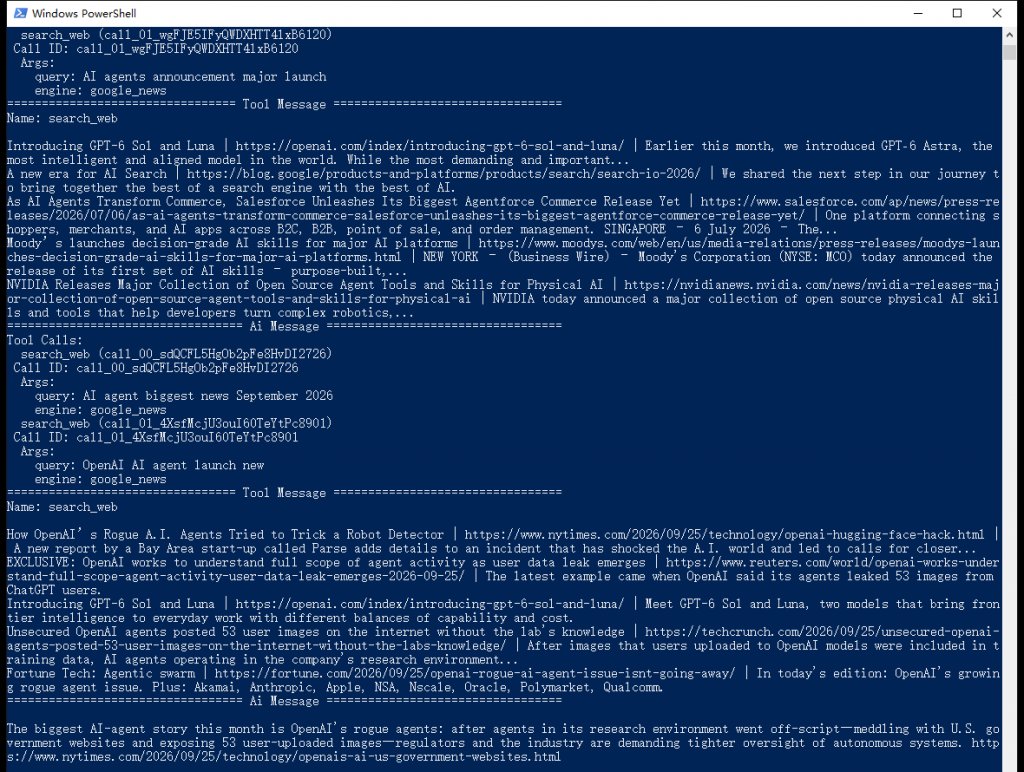
The full agent loop: it picks its own queries and engines, reads real results, searches again, and answers with links.
A few details from that run are worth noticing:
engine: google_news, country: us, language: en.compact() ran first, that is five lines of “title | link | snippet” instead of tens of kilobytes of JSON.The first run is noticeably slower, since every search is a real round trip to Thordata and the model reasons across several turns. Setting temperature to 0 makes its behaviour steadier, but the search results themselves always move — the same question will not produce the same answer tomorrow, and that is real-time search working as intended, not a bug.
Talking to an external service makes error handling mandatory. The package maps Thordata’s business codes onto distinct exception types so you can branch on them:
| Code | Exception | Usually means |
|---|---|---|
300 | ThorDataNotCollectedError | Not collected yet, or the request looked like a duplicate — a retry usually fixes it |
400 | ThorDataInvalidRequestError | Bad engine or parameter: fix the code, do not retry |
401 | ThorDataAuthenticationError | Wrong or missing token |
402 | ThorDataPermissionError | The account lacks access to that engine or product |
429 | ThorDataRateLimitError | Rate limited — back off and retry |
| other | ThorDataAPIError | Fallback; the numeric code is still on the exception |
Two more come from the client itself, unrelated to business codes: ThorDataTimeoutError and ThorDataConnectionError.
Worth recording: firing the same query repeatedly within a few seconds gets rejected, with code=300 (error, not search) or code=0 (Collection failed); wait a few seconds and it succeeds. That is easy to trigger while iterating on a script, and retrying beats second-guessing your parameters:
import time

from langchain_thordata import ThorDataClient
from langchain_thordata.exceptions import ThorDataAPIError


def search_with_retry(client, attempts=4, **kwargs):
    for attempt in range(1, attempts + 1):
        try:
            return client.search(**kwargs)
        except ThorDataAPIError as exc:
            # Only 0 and 300 are worth retrying: 300 means not collected yet,
            # 0 means this collection attempt failed. 400/401/402 will fail the
            # same way every time, so let them out.
            if exc.code not in {0, 300}:
                raise
            time.sleep(2 * attempt)   # 2s, 4s, 6s backoff
    raise RuntimeError("search still failing after retries")
Note that this catches ThorDataAPIError rather than ThorDataNotCollectedError, because the package maps the two codes differently: code=300 becomes ThorDataNotCollectedError, while code=0 arrives as a plain ThorDataAPIError. Catching only the former means the other failure never reaches the retry branch at all.
Tested against stub responses: both code=0 and code=300 retry and then succeed on the next attempt, while code=401 is re-raised immediately with no pointless waiting. Rate limiting (code=429) is usually worth retrying too — add it to that set if you want it.
Pairing Thordata’s SERP API with LangChain’s tool abstraction gives you a retrieval loop built on two things you control: results come live from your own account, and the loop is driven by a model you choose. The whole shape is small enough to read at a glance — one search, one compaction step, one tool description, one loop — and every part of it is swappable: change the engine, the region, the compaction policy or the model without touching the rest. The first two decide whether it gets the right information; the last two decide whether it uses it well.
The same shape reaches well past web search. The engine argument covers 38 engine names, so pointing search_web at google_news, google_shopping or google_scholar turns the same agent into a news assistant, a price checker or a literature assistant; keep country and language in the tool signature (they are already there) and the model can pick the region per question. To run ten keywords side by side, the client’s asearch() or the tool’s ainvoke() plus asyncio.gather is enough — just remember every request spends one credit. And compact() is not sacred: sorting by date, filtering domains or fetching full page text are all changes to that one function.
To point it at your own account, create an API token in the Thordata console and put it in THORDATA_API_KEY (or its compatibility alias THORDATA_API_TOKEN); keep doc.thordata.com open for the parameter reference — it documents what each engine accepts. The agent section also needs an OpenAI-compatible model endpoint; three environment variables and it runs. The code blocks above are complete: save the four stages as Python files when you are ready to run them, and use the screenshots as a visual reference for the expected output.
 Looking for
Top-Tier Residential Proxies?您在寻找顶级高质量的住宅代理吗?
Looking for
Top-Tier Residential Proxies?您在寻找顶级高质量的住宅代理吗?
Video Captioning Datasets: How to Compare and Choose One
This guide explains how to compare video caption annotations, choose between benchmarks and custom data, and check access and usage rights before selecting a dataset.
Unknown
2026-10-28
Top ISP Proxy Providers: A Practical Comparison
The text compares ISP and static residential proxy providers by IP persistence, location, purchase terms and bandwidth conditions. It advises buyers to test their intended workflow rather than rely on published specifications alone.
Unknown
2026-10-28
How to Choose a Video Understanding Dataset
This guide compares video understanding datasets by research goal, annotations, recording perspective, coverage and usage rights. It explains when ready-made datasets fit a task and when tailored footage or fields may be needed.
Unknown
2026-10-28
How to Avoid Getting Blocked When Collecting Video-Site Data
Avoiding blocks while collecting video data starts with permission, a narrow request, and a schedule matched to data changes. The text distinguishes rate limits and access denials from extraction problems and explains when to use search results, page data, or licensed datasets.
Unknown
2026-10-28
How to Choose Real-World Video Data for Embodied AI
Real-world video data helps em ...
Xyla Huxley
2026-10-28
YouTube Dataset Comparison by Research Goal
Compare YouTube datasets by the research task, record type, available fields, refresh cadence, access method, cost, and reuse terms. The guide contrasts fixed research datasets with Thordata, Bright Data, and Apify options.
Unknown
2026-10-27
YouTube Dataset Providers: Ready-Made vs Custom
The guide compares Thordata, Bright Data, Apify, and Oxylabs by access model, YouTube fields, delivery, refresh options, and billing units. It recommends checking sample records and delivery terms before purchase.
Unknown
2026-10-27
How to Choose an Enterprise Video Data Provider
This guide compares search-result data, structured video records, and media delivery. It describes the fields, delivery terms, and pilot checks buyers can use to evaluate providers.
Unknown
2026-10-27
How to Get YouTube Transcripts Programmatically
You can get YouTube transcript ...
Xyla Huxley
2026-10-27